

Zenith EVM: Testnet documentation
Quickstart for EVM
In the below sections we walk through the steps to deploy a simple Solidity contract to Zenith EVM Testnet using standard Ethereum tooling.
To explore Canton-side interactions and our Gateway, connecting Zenith EVM testnet and the underlying Canton test network, check out our dedicated section under Canton and Gateway developer guides.
Zenith EVM is a Reth-based environment and exposes standard Ethereum JSON-RPC endpoints. Most EVM workflows only require changing your network configuration.
Add the testnet to your wallet
Add Zenith EVM Testnet as a custom network in MetaMask or another EVM wallet.
| Field | Value |
|---|---|
| Network name | Zenith EVM Testnet |
| RPC URL | https://rpc.testnet.zenith.network/ |
| RPC name | Zenith EVM Testnet RPC |
| Chain ID | 936485 |
| Token symbol | ZTH |
| Block explorer URL | https://explorer.testnet.zenith.network/ |
Funding your wallet
Get testnet tokens
Use the Zenith EVM testnet faucet:
ZTH is the native gas token for Zenith EVM testnet. It has 18 decimals and is required to deploy contracts and send transactions.
For the basic EVM Quickstart, you only need ZTH. Testnet wCTN (Wrapped Canton) is only relevant for Canton-native workflows that interact directly with the local Canton test network.
Create a simple contract
Below is a simple contract example that can be used to test contract deployment to Zenith EVM.
// SPDX-License-Identifier: MITpragma solidity ^0.8.24;contract Counter { uint256 public number; event NumberChanged(uint256 newNumber); function setNumber(uint256 newNumber) external { number = newNumber; emit NumberChanged(newNumber); } function increment() external { number += 1; emit NumberChanged(number); }}Configure your environment
For testing, you can set your RPC URL, chain ID, and deployer private key as environment variables.
export ZENITH_RPC_URL="<zenith-evm-rpc-url>"export ZENITH_CHAIN_ID="<zenith-evm-chain-id>"export PRIVATE_KEY="<your-private-key>"Important note: Storing a private key as an environment variable is common for development and testing, but for production you should:
- Never commit .env files to version control
- Add .env to your .gitignore
- Consider using a secrets manager (e.g. AWS Secrets Manager, HashiCorp Vault) for production deployments
- Use a dedicated deployer wallet with only the funds needed
Deploy with Foundry
Follow the below instructions to deploy your contract using Foundry:
forge init zenith-countercd zenith-counter# Replace the default Counter with the contract above.forge buildforge create \ --rpc-url "$ZENITH_RPC_URL" \ --private-key "$PRIVATE_KEY" \ src/Counter.sol:CounterThe deploy command returns the deployed contract address and transaction hash.
Interact with your contract
With your contract deployed, you can read its state and send transactions directly from the command line using Foundry's cast tool.
export COUNTER_ADDRESS="<deployed-contract-address>"cast call \ --rpc-url "$ZENITH_RPC_URL" \ "$COUNTER_ADDRESS" \ "number()(uint256)"cast send \ --rpc-url "$ZENITH_RPC_URL" \ --private-key "$PRIVATE_KEY" \ "$COUNTER_ADDRESS" \ "increment()"View your transaction
The explorer monitors both the Canton layer and EVM layer in real time, currently tracking Canton updates and EVM blocks in sync.
Open Zenith Explorer:
Search for your EVM transaction hash using the search bar at the top. The explorer provides the following views:
- Blocks: browse EVM block history
- Transactions: full list of indexed EVM transactions
- Linked Transactions: shows EVM transactions linked to their corresponding Canton updates
- Contracts: view deployed contract details
Transaction pages show standard EVM transaction details, logs, and contract interactions.
The Linked transactions view is unique to Zenith and it shows the Canton update ID corresponding to each EVM transaction, letting you trace the full lifecycle of a transaction from EVM to Canton.
Note on average latency: on the dashboard, the average latency of 3-4 seconds means end-to-end transaction processing time from submission to finality on the Canton test network.
Behind the scenes, EVM transactions submitted through the RPC are collected by the Zenith EVM Sequencer and included in Canton-mediated block proposals; this does not change the standard EVM developer workflow.
Further EVM developer resources
For a deeper dive into EVM fundamentals, Solidity development patterns, and the standard tooling that Zenith EVM is fully compatible with, refer to the Ethereum developer documentation:
- Ethereum developer docs: core concepts, smart contract development, and deployment guides.
- Ethereum JSON-RPC reference: full specification of the
eth_*methods supported by Zenith EVM. - Ethereum JavaScript APIs: guides for ethers.js, web3.js, and other client libraries.
Developer guides for EVM
Below you will find developer guides to interact with Zenith EVM directly.
To explore Canton-side interactions and our Gateway, connecting Zenith EVM testnet and the underlying Canton test network, check out our dedicated section under Canton and Gateway developer guides.
Configure MetaMask
- Open MetaMask
- Select the network dropdown
- Choose Add a custom network
- Enter the Zenith EVM Testnet details as follows
| Field | Value |
|---|---|
| Network name | Zenith EVM Testnet |
| RPC URL | https://rpc.testnet.zenith.network/ |
| RPC name | Zenith EVM Testnet RPC |
| Chain ID | 936485 |
| Token symbol | ZTH |
| Block explorer URL | https://explorer.testnet.zenith.network/ |
Alternatively, add the network with one click:
After adding the network, request testnet ZTH at https://explorer.testnet.zenith.network/faucet.
Gas and fees
The current Zenith EVM testnet uses standard EVM gas semantics at the execution layer. Gas estimates and transaction receipts are available through standard Ethereum JSON-RPC methods such as eth_estimateGas and eth_getTransactionReceipt.
Gas is paid in ZTH, the native currency of Zenith EVM Testnet.
Configure Foundry
Foundry works out of the box with Zenith EVM, the only setup required is adding the testnet RPC endpoint. The examples below use a simple Counter contract to demonstrate the full build → deploy → transact → read workflow.
Add a Zenith EVM RPC alias to foundry.toml.
[rpc_endpoints]zenith_testnet = "${ZENITH_RPC_URL}"Use environment variables for values that may change.
export ZENITH_RPC_URL="<zenith-evm-rpc-url>"export PRIVATE_KEY="<your-private-key>"Build and deploy:
forge buildforge create \ --rpc-url zenith_testnet \ --private-key "$PRIVATE_KEY" \ src/Counter.sol:CounterSend a transaction:
cast send \ --rpc-url zenith_testnet \ --private-key "$PRIVATE_KEY" \ "$COUNTER_ADDRESS" \ "increment()"Read state:
cast call \ --rpc-url zenith_testnet \ "$COUNTER_ADDRESS" \ "number()(uint256)"Configure Hardhat
Hardhat projects connect to Zenith EVM by adding a network entry that points to the testnet RPC. The setup below uses TypeScript and the official Hardhat Toolbox plugin, though a JavaScript config works identically.
Install Hardhat if needed:
npm install --save-dev hardhat @nomicfoundation/hardhat-toolboxCreate or update your Hardhat config:
import { HardhatUserConfig } from "hardhat/config";import "@nomicfoundation/hardhat-toolbox";const config: HardhatUserConfig = { solidity: "0.8.24", networks: { zenithTestnet: { url: process.env.ZENITH_RPC_URL || "", chainId: Number(process.env.ZENITH_CHAIN_ID || "0"), accounts: process.env.PRIVATE_KEY ? [process.env.PRIVATE_KEY] : [], }, },};export default config;Set your environment:
export ZENITH_RPC_URL="<zenith-evm-rpc-url>"export ZENITH_CHAIN_ID="<zenith-evm-chain-id>"export PRIVATE_KEY="<your-private-key>"Deploy:
npx hardhat compilenpx hardhat run scripts/deploy.ts --network zenithTestnetExample deploy script:
import { ethers } from "hardhat";async function main() { const Counter = await ethers.getContractFactory("Counter"); const counter = await Counter.deploy(); await counter.waitForDeployment(); console.log("Counter deployed to:", await counter.getAddress()); console.log("Deployment tx:", counter.deploymentTransaction()?.hash);}main().catch((error) => { console.error(error); process.exitCode = 1;});Configure Remix
Remix requires no local installation, just connect MetaMask to the Zenith EVM testnet and deploy directly from the browser.
Use Remix through MetaMask.
- Add Zenith EVM Testnet to MetaMask.
- Fund your account with testnet ZTH.
- Open Remix.
- Compile your Solidity contract.
- In Deploy & Run Transactions, select Injected Provider - MetaMask.
- Confirm that MetaMask is connected to Zenith EVM Testnet.
- Deploy as you would on any EVM chain.
Remix will send the transaction through MetaMask to the Zenith EVM RPC endpoint.
Note: Developers can also use Remix's "External HTTP Provider" option and enter the RPC URL directly.
Deploy smart contracts
Deploying to Zenith EVM is identical to deploying to Ethereum or any EVM-compatible chain. The table below summarizes what stays the same and the few things to keep in mind.
| Topic | Guidance |
|---|---|
| Compiler | Use your normal Solidity compiler settings. |
| Deployment | Use standard EVM deployment transactions. |
| Gas token | Pay gas in ZTH. |
| Nonces | Use normal Ethereum account nonce behavior. |
| Receipts | Use standard transaction receipts. |
| Events | Use standard EVM logs and ABI decoding. |
| Verification | Contract verification is supported in Zenith EVM’s testnet explorer. |
| Randomness | Do not rely on block.prevrandao for Ethereum Beacon Chain-style validator-selection randomness. If your contract needs randomness, use an application-level randomness source or oracle pattern appropriate for Zenith EVM. |
Interacting with contracts
Once a contract is deployed, you can read its state and send transactions using any standard Ethereum library. The examples below use the same Counter contract from the deployment step and work identically to how they would on Ethereum, just point the provider at the Zenith EVM RPC endpoint.
Ethers.js example
import { Contract, JsonRpcProvider, Wallet } from "ethers";import counterAbi from "./Counter.abi.json" assert { type: "json" };const provider = new JsonRpcProvider(process.env.ZENITH_RPC_URL);const wallet = new Wallet(process.env.PRIVATE_KEY!, provider);const counter = new Contract( process.env.COUNTER_ADDRESS!, counterAbi, wallet);const before = await counter.number();console.log("Before:", before.toString());const tx = await counter.increment();console.log("Tx hash:", tx.hash);const receipt = await tx.wait();console.log("Included in block:", receipt?.blockNumber);const after = await counter.number();console.log("After:", after.toString());Web3.js example
import Web3 from "web3";import counterAbi from "./Counter.abi.json" assert { type: "json" };const web3 = new Web3(process.env.ZENITH_RPC_URL!);const account = web3.eth.accounts.privateKeyToAccount(process.env.PRIVATE_KEY!);web3.eth.accounts.wallet.add(account);const counter = new web3.eth.Contract( counterAbi as any, process.env.COUNTER_ADDRESS);const before = await counter.methods.number().call();console.log("Before:", before);const receipt = await counter.methods.increment().send({ from: account.address,});console.log("Tx hash:", receipt.transactionHash);Once a transaction receipt is returned by the Zenith EVM RPC, the transaction has been finalized through Canton. Applications do not need to wait for multiple block confirmations as they would on chains with probabilistic-finality.
More about Canton workflows
To explore Canton-native workflows further, the below resources can be a good starting point:
| Resource | Link | Use it for |
|---|---|---|
| Canton Network docs | https://docs.canton.network/ | Single entry point for Canton, Daml, SDKs, and application development. |
| Global Synchronizer docs | https://docs.canton.network/global-synchronizer/understand/overview | Validator and node operations, and the LocalNet / DevNet / TestNet / MainNet environment model. |
| Canton API reference | https://docs.canton.network/api-reference | Ledger API (gRPC and JSON), token standard and Canton Coin OpenAPI endpoints, Wallet SDK and dApp SDK client libraries. |
| App development on Canton | https://docs.canton.network/appdev/get-started/choose-your-path | Role-based learning paths, the Daml SDK and tooling setup, and the progressive module track. |
Network information
Testnet details
The Zenith EVM Testnet is a public test environment where you can deploy contracts, initiate transactions, and explore the network before going to production. Use the details below to configure your wallet or tooling and get started with testnet tokens from the faucets.
| Field | Value |
|---|---|
| Network name | Zenith EVM Testnet |
| Chain ID | 936485 |
| Zenit EVM Testnet RPC | https://rpc.testnet.zenith.network/ |
| Explorer | https://explorer.testnet.zenith.network/ |
| Faucet | https://explorer.testnet.zenith.network/faucet |
| Native currency name | Zenith token |
| Currency symbol | ZTH |
| Decimals | 18 |
JSON-RPC
Zenith EVM exposes standard Ethereum JSON-RPC endpoints and supports the standard JSON-RPC methods included in Reth, which implements the Ethereum JSON-RPC API. Commonly used methods include:
| Category | Methods |
|---|---|
| Chain status | eth_chainId, net_version, web3_clientVersion, eth_blockNumber |
| Accounts and balances | eth_getBalance, eth_getTransactionCount, eth_getCode, eth_getStorageAt |
| Calls and gas | eth_call, eth_estimateGas, eth_gasPrice, eth_feeHistory |
| Transactions | eth_sendRawTransaction, eth_getTransactionByHash, eth_getTransactionReceipt |
| Blocks | eth_getBlockByHash, eth_getBlockByNumber, eth_getBlockTransactionCountByHash, eth_getBlockTransactionCountByNumber |
| Logs | eth_getLogs, eth_newFilter, eth_getFilterChanges, eth_uninstallFilter |
For the full list of supported methods, refer to the Ethereum JSON-RPC API documentation.
Transactions submitted through the public Ethereum JSON-RPC interface follow the standard EVM submission model from the developer’s perspective; internally, Zenith EVM routes them through the Sequencer and Canton-mediated block proposal flow.
Basic JSON-RPC request
To send RPC requests, you can use the same request format you would use against an Ethereum node.
curl "$ZENITH_RPC_URL" \ -H "Content-Type: application/json" \ -d '{ "jsonrpc": "2.0", "method": "eth_chainId", "params": [], "id": 1 }'curl "$ZENITH_RPC_URL" \ -H "Content-Type: application/json" \ -d '{ "jsonrpc": "2.0", "method": "eth_blockNumber", "params": [], "id": 1 }'Custom RPC methods
Zenith EVM does not expose custom RPC methods on the public testnet RPC endpoint.
Some Zenith validator infrastructure uses internal block-builder RPC methods, such as blockBuilder_buildBlock, during Canton-mediated block production. These methods are not part of the public developer RPC surface and are not required for standard EVM application development.
Explorer
The explorer monitors both the Canton layer and EVM layer in real time, currently tracking Canton updates and EVM blocks in sync.
Open Zenith Explorer:
Search for your EVM transaction hash using the search bar at the top. The explorer provides the following views:
- Blocks: browse EVM block history
- Transactions: full list of indexed EVM transactions
- Linked Transactions: shows EVM transactions linked to their corresponding Canton updates
- Contracts: view deployed contract details
Transaction pages show standard EVM transaction details, logs, and contract interactions.
Note on average latency: on the dashboard, the average latency of 3-4 seconds means end-to-end transaction processing time from submission to finality on the Canton test network.
The Linked Transactions view is unique to Zenith and it shows the Canton update ID corresponding to each EVM transaction, letting you trace the full lifecycle of a transaction from EVM to Canton.
Canton and Gateway developer guides
This guide covers connecting your own Canton participant to the Zenith EVM Testnet network, and moving tokens between Canton and Zenith EVM with Zenith Gateway.
Contents
- Interacting with Zenith EVM from Canton: connect your participant
- Zenith Gateway overview: how token transfers work, and registering your own token
- Interacting with Gateway: network information, amounts, setup
- Gateway sample workflows: four step-by-step transfers
- Using Gateway from your application
- Gateway troubleshooting
Interacting with Zenith EVM from Canton
Zenith EVM Testnet runs on a full-fledged Canton test network operated by Zenith. You can connect your own Canton participant node to this network, host your own parties and Daml applications on it, and move tokens between Canton and Zenith EVM through Zenith Gateway.
This section covers how to connect your participant, prepare it for Gateway, and connect your application to it.
- Note: The Canton test network behind Zenith EVM Testnet is a separate network with its own private synchronizer, operated by Zenith. Any participant running the Canton version listed in Canton test network information can connect to it. It is not the Canton Network’s official DevNet or TestNet, and it is not the Global Synchronizer. Parties, holdings and DARs on Canton DevNet or TestNet are not visible here, and vice versa.
What you can do with your own participant
With a participant connected to the Zenith testnet synchronizer, you can:
- host your own Canton parties and receive tokens sent to them from Zenith EVM;
- send registered tokens from your parties to Zenith EVM addresses, through the destination address's mailbox party for that token (see How it works). A Canton party's inbox address cannot be a destination;
- transfer Gateway-issued tokens between Canton parties, without touching the EVM;
- run your own Daml applications against the same ledger that Zenith EVM testnet settles on.
Connecting a participant does not:
- Make it a Zenith EVM validator, or add it to the set of participants that confirm EVM blocks. It does confirm Gateway's settlement of your own parties' transfers to Zenith EVM, so keep it online while such a transfer is pending (see Keep your participant online);
- Give it access to other participants’ private Canton data;
- Automatically authorize its parties to act on Zenith’s or anyone else’s contracts;
- Let it build EVM blocks itself. Two Gateway routes need that:
GatewayService_CrossToEvmand the one-step return throughWrapperFactory. See What your participant cannot do on this testnet.
Onboarding at a glance
- Download the Canton build, and contact Zenith to get access to the Zenith bundle (the DARs).
- Configure and start your participant.
- Connect it to the Zenith testnet synchronizer.
- Verify the connection.
- Upload and vet the Zenith DARs, along with your own.
- Create parties and Ledger API users.
- Connect your application.
To connect your Canton participant to Zenith’s synchronizer, but access to the Zenith bundle is not public. To request access to the Gateway, please contact Zenith at [email protected], and Zenith can share the bundle.
The synchronizer allows any participant to connect to it that runs the below Canton version.You can find the connection details in the table below, while the Gateway values can be found in Gateway network information.
- Note: that all the EVM-side functionalities can be tested without connecting a participant or having access to the Zenith bundle.
Canton test network information
| Field | Value |
|---|---|
| Participant registration policy | Open: the synchronizer admits any participant that runs the Canton build listed below |
| Canton build | Canton open source 3.6.0-snapshot.20260902.20200.0.v90a37b4c, a snapshot published by Digital Asset. Direct download: a gzipped tar archive (about 300 MB) that contains lib/canton-open-source-3.6.0-snapshot.20260902.20200.0.v90a37b4c.jar. Step 1 shows how to extract it. SHA-256 of the jar: ab628b95ef6211ff978bd6bcbbae18f4f17ed8033eb7691a704ebbf32bbe030b. |
| Zenith bundle | The Zenith DARs and a MANIFEST file, in one directory. Contact Zenith at [email protected] to have access The DARs are listed in step 5. |
| Protocol version | dev (a development protocol version; see the note below) |
| Recommended Daml SDK version | 3.6.1-snapshot.20260903.34.0.v027a1da5 |
| Sequencer public API endpoint | https://synchronizer.testnet.zenith.network |
| Synchronizer ID | da::1220daf7fcc9d67e83d9d884ea3a30bc4d0f7927d3f8d1b570d6296a27569dc59943. Physical synchronizer ID, for pinning the connection in step 3: da::1220daf7fcc9d67e83d9d884ea3a30bc4d0f7927d3f8d1b570d6296a27569dc59943::dev-0 |
| TLS | TLS, with a publicly trusted certificate (issued by Google Trust Services). Java’s default trust store already trusts it, so you do not need a CA certificate or certificatesPath. |
| Zenith EVM Testnet RPC | https://rpc.testnet.zenith.network |
| Zenith EVM chain ID | 936485 |
The Canton Sequencer endpoint is a different endpoint from the Zenith EVM Testnet RPC. Your participant talks to the Sequencer. Your EVM wallets and tools talk to the RPC.
- Important: The testnet synchronizer runs a development Canton protocol version. Other Canton versions, including stock releases, are not supported. The
devprotocol version can change from one Canton build to the next, so run exactly the Canton snapshot listed above, and check its SHA-256 before you start it.
Prerequisites
Before you connect, you need:
- The Canton build, which you can download from Digital Asset, and the Zenith bundle (the DARs), which you can request access to from Zenith (see step 1 below), as well as Java 17 or Java 21 to run the build (the build has been run on both; no other version has been tried);
- Persistent storage for the participant (for example PostgreSQL);
- A persistent participant identity and persistent cryptographic keys;
- Outbound network access to the Sequencer endpoint;
- Access to the participant’s Canton console or Admin API;
- A Ledger API (gRPC or JSON) for your Daml application that only your trusted environment can reach, or that requires authentication.
Warning: Do not expose your participant’s Admin API publicly. If the Ledger API can be reached from outside your trusted environment, it must require authentication.
1. Download the Canton build and the Zenith bundle
If you’d like to test workflows using the Zenith Gateway, and connect a Canton participant to Zenith EVM Testnet, contact Zenith at [email protected] to request access to the bundle. It is a directory with the six DARs listed in step 5 in dars/, and a MANIFEST file. The MANIFEST names the commit the bundle was built from and lists a SHA-256 for each file of that build, including the Canton jar as bin/canton.jar. It can also list files that are not in your copy, such as Zenith’s service binaries, so the check below reads only the lines for the jar and the DARs.
Download the Canton build from Digital Asset’s public registry and save its jar in the bundle directory as bin/canton.jar. The commands in this guide run it from there. The download is a gzipped tar archive of about 300 MB, and the tar command extracts only the jar:
export BUNDLE=<the bundle directory>mkdir -p "$BUNDLE/bin"curl -fsSL https://europe-docker.pkg.dev/v2/da-images/public-unstable/components/canton-open-source/blobs/sha256:af613193d67938f910817a8737bd7dc0ab2ccace96d96581895ed6ef866e92fa \ | tar -xzO lib/canton-open-source-3.6.0-snapshot.20260902.20200.0.v90a37b4c.jar > "$BUNDLE/bin/canton.jar"Then check the jar, the DARs and your Java version:
shasum -a 256 "$BUNDLE/bin/canton.jar"sed -n '/^# sha256$/,$p' "$BUNDLE/MANIFEST" | grep -v '^#' | grep -E ' (bin/canton\.jar|dars/.*\.dar)$' | (cd "$BUNDLE" && shasum -a 256 -c)java -versionThe shasum command must print the published SHA-256 of bin/canton.jar. The MANIFEST check prints seven lines, one for the jar and one for each DAR, and each must end in OK. If either check fails, do not run the build. If the jar fails, download it again. If a DAR fails, contact Zenith for a new copy of the bundle. The command java -version must show Java 17 or Java 21.
2. Configure and start your participant
For general installation guidance, see Canton’s Install Canton documentation. Three settings are needed because the synchronizer runs a development protocol version. Set alpha-version-support and dev-version-support to yes, both globally and in the participant’s own parameters, and set non-standard-config = yes globally. Canton refuses to start a node that enables either version-support setting without non-standard-config.
The participant stores its state in PostgreSQL. Create an empty database for it before the first start, for example with createdb zenith_testnet_participant.
A minimal configuration looks like this (participant.conf). Replace the database user and password with your own:
canton { parameters { non-standard-config = yes alpha-version-support = yes dev-version-support = yes } participants { myparticipant { storage { type = postgres config { dataSourceClass = "org.postgresql.ds.PGSimpleDataSource" properties = { serverName = "localhost" portNumber = "5432" databaseName = "zenith_testnet_participant" user = "<database user>" password = "<database password>" } } } admin-api { address = "127.0.0.1", port = 5012 } ledger-api { address = "127.0.0.1", port = 5011 } http-ledger-api { address = "127.0.0.1", port = 7575 } parameters { alpha-version-support = yes dev-version-support = yes } } }}This configuration sets no auth-services under ledger-api, so the Ledger API and the JSON Ledger API accept every request without a token. That is acceptable only because both listen on 127.0.0.1. Before you bind either one to another address, configure auth-services and tls under ledger-api.
Use persistent storage for both the participant database and its cryptographic identity. If you delete or reinitialize this state, your participant gets a new participant ID. It also loses track of the parties it hosted and their holdings.
- Warning:
storage.type = memoryis fine for a quick experiment, but a participant with memory storage loses all of its state when it stops: its keys, its parties, its synchronizer connection, its DARs and its Ledger API users. When it starts again it gets a new participant ID, so you must repeat steps 3, 5 and 6. Parties created before the stop cannot be recovered: their holdings stay on the ledger, but nobody can act on them. Use persistent storage for anything you want to keep.
Start the participant with an interactive console. You type the console commands of steps 2 to 6 there:
java -jar "$BUNDLE/bin/canton.jar" -c participant.confTo run the participant without a console instead, start it with daemon and the bootstrap script connect.canton from step 3, which connects it to the synchronizer:
java -jar "$BUNDLE/bin/canton.jar" daemon -c participant.conf --bootstrap connect.cantonTo run this guide’s console commands against a participant started with daemon, generate a remote console configuration once (this writes remote-myparticipant.conf), then open a console with it:
java -jar "$BUNDLE/bin/canton.jar" generate remote-config -c participant.confjava -jar "$BUNDLE/bin/canton.jar" -c remote-myparticipant.confOnce the participant has started, check its status in the Canton console:
myparticipant.health.statusRecord its full participant ID. The console shortens identifiers when it displays them, so print the full string:
myparticipant.id.toProtoPrimitiveIt has the form PAR::myparticipant::1220 followed by 64 hex digits. Treat this identifier as stable, because it identifies your participant in the network’s Canton topology. The part after the last :: is your participant’s namespace. Parties you create with the commands in step 6 get this namespace, so their IDs have the form <hint>::<namespace>.
3. Connect to the Zenith testnet synchronizer
In your participant’s Canton console, connect to the Sequencer. The first argument is a synchronizer alias. You choose it, it is local to your participant, and it names this connection in later commands. This guide uses zenith-testnet.
val zenithSequencerUrl = "https://synchronizer.testnet.zenith.network"myparticipant.synchronizers.connect("zenith-testnet", zenithSequencerUrl)Give the endpoint exactly as published, including its scheme: http:// connects over plain gRPC and https:// over TLS. connect rejects an endpoint without a scheme with the error Scheme `null` is invalid, and certificatesPath has no effect on an http:// endpoint.
Your participant stores the connection and reconnects on its own after a restart.
The testnet Sequencer uses TLS with a publicly trusted certificate, so the call above needs no certificatesPath. Only if your Java runtime uses a custom trust store that does not include the public root certificates, pass the path of a file with the issuing CA’s certificate:
myparticipant.synchronizers.connect( "zenith-testnet", zenithSequencerUrl, certificatesPath = "/path/to/zenith-testnet-ca.crt")To pin the synchronizer ID, pass the physical synchronizer ID published in Canton test network information as physicalSynchronizerId. The physical synchronizer ID is the synchronizer ID followed by ::<protocol version>-<serial>; this parameter does not accept the plain synchronizer ID. Your participant then refuses to connect to any other synchronizer at that URL: connect fails with SYNC_SERVICE_BAD_CONNECTIVITY, and the message says the synchronizer ID does not match expected.
myparticipant.synchronizers.connect( "zenith-testnet", zenithSequencerUrl, physicalSynchronizerId = Some(PhysicalSynchronizerId.tryFromString("da::1220daf7fcc9d67e83d9d884ea3a30bc4d0f7927d3f8d1b570d6296a27569dc59943::dev-0")))Pass physicalSynchronizerId, and certificatesPath if you need it, in your first connect call. If you need both, pass them in the same call. Once the alias zenith-testnet is registered, connect with that alias only reconnects: it ignores a new endpoint URL and new physicalSynchronizerId and certificatesPath values, and reports no error. The console still reads a certificatesPath file before the call, so a path to a file that does not exist fails with failed to load. A connect call that fails does not register the alias, so you can correct the arguments and call connect again. If you start the participant with connect.canton, add these arguments to the connect call in that script.
To pin the synchronizer ID of a connection that is already registered, disconnect, change the stored connection with modify, and reconnect:
myparticipant.synchronizers.disconnect("zenith-testnet")myparticipant.synchronizers.modify( "zenith-testnet", _.copy(synchronizerId = Some(PhysicalSynchronizerId.tryFromString("da::1220daf7fcc9d67e83d9d884ea3a30bc4d0f7927d3f8d1b570d6296a27569dc59943::dev-0"))))myparticipant.synchronizers.reconnect("zenith-testnet")For an unattended start, save the connection as a bootstrap script, connect.canton. It waits for the participant to start, connects it if it is not connected, and waits until the connection is active:
val p = participants.local.headutils.retry_until_true(timeout = 120.seconds) { try { p.health.initialized() } catch { case _: Exception => false }}if (p.synchronizers.list_connected().isEmpty) { p.synchronizers.connect("zenith-testnet", "https://synchronizer.testnet.zenith.network")}utils.retry_until_true(timeout = 60.seconds) { p.synchronizers.active("zenith-testnet") }println("connected")If the endpoint uses TLS with a certificate that is not in your Java runtime’s default trust store, add certificatesPath = "/path/to/zenith-testnet-ca.crt" to the connect call. Start the participant with java -jar "$BUNDLE/bin/canton.jar" daemon -c participant.conf --bootstrap connect.canton. It prints connected once the participant is on the synchronizer. If the Sequencer cannot be reached, or the connection is not active within 60 seconds, the script fails and the participant process exits with status 3. The participant stores the connection after the first successful start, so later starts can use java -jar "$BUNDLE/bin/canton.jar" daemon -c participant.conf without --bootstrap. Started that way, a participant that cannot reach the Sequencer keeps retrying the connection instead of exiting.
4. Verify the connection
List the synchronizers your participant is connected to:
myparticipant.synchronizers.list_connected()The result should contain one entry with:
- The synchronizer alias
zenith-testnet; - A
physicalSynchronizerIdwhose first part is the synchronizer ID published in Canton test network information. The console shortens this ID and appends::<protocol version>-<serial>, so you cannot compare it with the published ID character by character; healthy = true.
This is how the interactive console displays the result. If you print it from a script, for example with println in a bootstrap script, the fields appear without their names: ListConnectedSynchronizersResult(Synchronizer 'zenith-testnet',da::1220daf7fcc9...::dev-0,true), where the final true is healthy.
To compare the synchronizer ID with the published one, print it in full:
myparticipant.synchronizers.id_of("zenith-testnet").toProtoPrimitiveYou can also check the connection directly:
myparticipant.synchronizers.active("zenith-testnet")This returns true once the connection is active.
5. Upload and vet the DARs
Your participant can only take part in a transaction if it has vetted the Daml packages used in the parts of the transaction that its parties see. To hold or send Gateway tokens, upload the DARs from the Zenith bundle before you create any parties:
| DAR | What it contains |
|---|---|
zenith-evm-0.1.0.dar | Zenith EVM’s core on-ledger contracts |
zenith-gateway-proto-0.1.0.dar | Gateway: token registrations, mailbox contracts, Gateway-issued tokens and their transfer factories; also the testnet’s Canton test token TTA and its registry |
zenith-gateway-faucet-0.1.0.dar | The faucet that mints TTA |
splice-api-token-metadata-v1-1.0.0.dar | CIP-56 token standard: metadata interface |
splice-api-token-holding-v1-1.0.0.dar | CIP-56 token standard: holding interface |
splice-api-token-transfer-instruction-v1-1.0.0.dar | CIP-56 token standard: transfer interface |
Why the order matters: Gateway adds a new party to its inbox index shortly after the party is created, whether or not your participant has vetted Gateway’s packages. Until your participant has vetted them, Gateway cannot credit any party your participant hosts. A deposit to such a party is refused, and after 3 refusals Gateway drops the depositing EVM transaction before it is included in a block, together with any other deposits in the same block proposal. The sender keeps the tokens and has to send again. Vetting is recorded for your participant, not for each party, so once it takes effect it covers every party your participant hosts, including parties created before the upload. Connect, upload the DARs, then create parties, so that no deposit can reach one of your parties before the upload.
- Important: Use the DARs from the Zenith bundle, not DARs you build from source. The Daml sources can change after the bundle was built, and a package built from changed sources, or with a different SDK version, gets a different package ID. The check below shows whether your DARs match.
Check the Gateway package ID before you upload anything. Run the shell commands of this step and step 6 in a second terminal, because the Canton console (or the daemon process) runs in the first one, and set BUNDLE there as well (export BUNDLE=<the bundle directory>, as in step 1). The check needs jq and unzip, and these variables. They are the same values as in the export block under Test tokens, which the Gateway workflows use later:
export REGISTRY=https://gateway.testnet.zenith.networkexport GATEWAY_PARTY=gateway::12205db909e5f8c8d6b0c8033d4b52439195b73d8235c374fb653b280ca78272beb8export TKA=0x8464135c8f25da09e49bc8782676a84730c318bcexport TKA_ID="erc20:$(printf %s "${TKA#0x}" | tr 'A-F' 'a-f')"Then run the check:
PKG=$(curl -s -X POST "$REGISTRY/registry/transfer-instruction/v1/transfer-factory" \ -H 'content-type: application/json' \ -d '{"choiceArguments":{"expectedAdmin":"'"$GATEWAY_PARTY"'","transfer":{"sender":"anyone::1220","receiver":"anyone::1220","amount":"1.0","instrumentId":{"admin":"'"$GATEWAY_PARTY"'","id":"'"$TKA_ID"'"}}}}' \ | jq -r '.choiceContext.disclosedContracts[0].templateId | split(":")[0]')echo "$PKG"if echo "$PKG" | grep -Eqx '[0-9a-f]{64}'; then unzip -Z1 "$BUNDLE"/dars/zenith-gateway-proto-*.dar | grep -F "$PKG.dalf"else echo "error: the registry returned no package ID; check REGISTRY, GATEWAY_PARTY and TKA_ID"fiThe echo prints the package ID, 64 hex digits. The unzip line then prints exactly one .dalf file whose name ends in that ID. If it prints nothing, your bundle is from a different build than the deployed Gateway: do not upload it. Contact Zenith for the current bundle. If you see the error: line, the registry request failed and nothing was checked.
Upload the DARs only after the check passes. Every build of the Zenith packages has the same name and version, and Canton refuses to vet a second, different package with the same name and version (KNOWN_PACKAGE_VERSION). A participant that has already vetted the wrong build cannot take the current bundle. The simplest fix is a new participant with an empty database, which costs nothing at this step because you have no parties yet.
Set LEDGER to your participant’s JSON Ledger API, the http-ledger-api address from step 2. The JSON Ledger API commands in steps 5 and 6 use it:
export LEDGER=http://127.0.0.1:7575If your Ledger API requires authentication, add -H "authorization: Bearer <token>" to each curl "$LEDGER…" call in steps 5 and 6.
Upload each DAR from the console. sys.env("BUNDLE") reads BUNDLE, the bundle directory from step 1, from the shell you started the console in:
myparticipant.dars.upload(sys.env("BUNDLE") + "/dars/zenith-evm-0.1.0.dar")myparticipant.dars.upload(sys.env("BUNDLE") + "/dars/zenith-gateway-proto-0.1.0.dar")// ...and the remaining fourOr upload them all through the JSON Ledger API:
for d in "$BUNDLE"/dars/*.dar; do curl -s -w " %{http_code} $d\n" -X POST \ -H 'content-type: application/octet-stream' \ --data-binary @"$d" "$LEDGER/v2/dars"doneEach line of output shows the response body, the HTTP status and the file, for example {} 200 /path/to/bundle/dars/zenith-evm-0.1.0.dar. The status must be 200 for all six. Uploading a DAR that your participant already has also returns 200, so you can run the loop again safely, including after uploading some of the DARs from the console.
Uploading a DAR also vets its packages by default. Vetting means your participant declares that it has loaded those package versions and will interpret them. Confirm that the DARs are installed:
myparticipant.dars.list()Confirm that your participant has the Gateway package: curl -s "$LEDGER/v2/packages" | jq -r '.packageIds[]' | grep -x "$PKG" prints the ID once.
Then upload your own application’s DARs the same way. Build them with the Daml SDK version listed in Canton test network information.
Uploading a DAR to your participant installs it there only. It does not install anything on Zenith’s participants or on any other participant. When a transaction involves parties hosted on several participants, each of those participants must have loaded and vetted the packages it needs to interpret its part.
6. Create parties and Ledger API users
Create the Canton parties your application uses. Host them on your participant with submission permission. From the console:
val alice = myparticipant.parties.enable("alice")Print the full party ID with alice.toProtoPrimitive. The console’s own display of alice is shortened; do not copy it.
Or through the JSON Ledger API:
curl -s -X POST "$LEDGER/v2/parties" -H 'content-type: application/json' \ -d '{"partyIdHint": "alice", "identityProviderId": ""}' | jq -r .partyDetails.partyThe full party ID is alice::<your namespace>. Always pass the full party ID, including the namespace, to anyone who sends you tokens.
Next, create a Ledger API user for your application and grant it rights:
actAsfor parties on whose behalf the application submits commands;readAsfor any additional parties whose ledger state the application must read.
curl -s -X POST "$LEDGER/v2/users" -H 'content-type: application/json' \ -d '{"user": {"id": "my-app", "primaryParty": "", "isDeactivated": false, "identityProviderId": ""}, "rights": []}'curl -s -X POST "$LEDGER/v2/users/my-app/rights" -H 'content-type: application/json' \ -d '{"userId": "my-app", "identityProviderId": "", "rights": [ {"kind": {"CanActAs": {"value": {"party": "<alice-party-id>"}}}}, {"kind": {"CanReadAs": {"value": {"party": "<alice-party-id>"}}}} ]}'Users and their rights are local to your participant. Party IDs are network identities, and any participant on the synchronizer may reference them.
Your parties are ready for Gateway on their own. Zenith’s participant learns about your new party through the synchronizer’s topology. Gateway then adds the party to its inbox index, usually within 30 seconds. It can take longer while Gateway is busy settling other transfers. After that, tokens sent to the party’s inbox address on Zenith EVM are credited to it. Tokens sent before then are mined in an ordinary transfer and stay in the inbox until Gateway credits them in a later block. wTTA is an exception; see Workflow 2/b. You don’t need to request anything or pay any fee.
7. Connect your application
Point your application at your participant’s Ledger API:
| Application setting | Value |
|---|---|
| Ledger API endpoint | Your participant’s gRPC or JSON Ledger API. |
| Ledger API authentication | Configured locally. |
| Application user | The user you created in step 6. |
| Application party IDs | The parties you created or host on your participant. |
Your application can now submit ordinary Daml commands through your participant. To move tokens to or from Zenith EVM, continue with Interacting with Gateway and the Gateway sample workflows.
Keep your participant online
When one of your parties sends tokens to Zenith EVM, Gateway settles the transfer in a transaction your party must confirm. This covers the standard route used by wallets and by any participant without the EVM extension (see Transfer directions).
-
Warning: Keep your participant running and connected while any transfer from your parties to Zenith EVM is still pending. If your participant stops answering, the transfer can be neither settled nor rejected, because your party must confirm both. You cannot withdraw it either, because the withdrawal goes through your own participant. Each settlement attempt also waits about 30 seconds for the mediator to time out, which slows block production for every user of the testnet. When your participant answers again, an attempt that looked refused may still commit. Before you send the transfer again, check your balance on Zenith EVM, or look for a
MintedorReleasedevent from the Gateway contract with your address asto. Set a shortexecuteBefore(a few minutes) on these transfers. Shut down only whenpending_count <party>prints0for each of your parties (pending_countis one of the helper functions in Set up your accounts and tools). A line starting witherror:means the read failed and says nothing about pending transfers. -
Warning: A party with a standing acceptance (transfer preapproval), such as the TTA standing acceptance from Workflow 2/b, also needs your participant whenever someone sends it wTTA or another Gateway ERC-20 that returns a Canton token. Your party signed the standing acceptance, and Gateway’s settlement reads it, so your participant must confirm that settlement. While your participant does not answer, each settlement attempt waits about 30 seconds for the mediator to time out, and no block is produced for anyone during that time. After three attempts Gateway drops the deposit. Your party cannot remove the TTA standing acceptance on its own. Create a standing acceptance only for a party whose participant stays online, and never for a party on a participant with
storage.type = memory.
Disconnecting your participant
To disconnect without deleting the saved connection:
myparticipant.synchronizers.disconnect("zenith-testnet")To reconnect later:
myparticipant.synchronizers.reconnect("zenith-testnet")Disconnecting does not delete your participant identity, DARs, parties or local ledger state. Before you disconnect, check that pending_count <party> prints 0 for each of your parties, so that none of them has a pending transfer to a mailbox party. A line starting with error: means the read failed and says nothing about pending transfers. Also check that nobody will send wTTA (or another Gateway ERC-20 that returns a Canton token) to a party of yours with a standing acceptance while you are disconnected (see Keep your participant online).
What your participant cannot do on this testnet
- Build EVM blocks: Gateway’s one-transaction routes (
GatewayService_CrossToEvmand the one-step return throughWrapperFactory) build the EVM block inside the sender’s own transaction. They need four things: thezenith-evmexternal-call extension on your participant, an external-call service of your own, a block builder of your own that is in sync with the chain, and eight or nine contracts that only the operator can disclose. A participant with no external-call extension is refused at submission withINTERPRETATION_EXTERNAL_CALL_ERROR_EXECUTION_FAILEDand a cause ending inExternal calls not supported, and nothing moves. Without the operator’s contracts, the command fails earlier, with a different error.- Every crossing you need has a standard route that works without them. See Transfer directions.
- Register tokens: Only Zenith, which operates the Gateway party, can register a token. You can ask Zenith to register yours, and Zenith decides whether to do so. See more details under Registering your own token.
- Use external parties. Parties whose keys are held outside a participant and that sign through interactive submission have not been tested with Gateway yet.
Troubleshooting onboarding
| Symptom | Likely cause | What to do |
|---|---|---|
| The participant does not connect, or fails with a protocol version error | You are running a Canton version other than the one in Canton test network information, or alpha-version-support / dev-version-support is not set | Use the Canton build from step 1, set non-standard-config = yes globally, and set both flags globally and in the participant’s parameters |
The participant does not start and reports Enabling dev-version-support for participant myparticipant requires you to explicitly set canton.parameters.non-standard-config = yes (or the same message for alpha-version-support) | non-standard-config is not set | Add non-standard-config = yes to the global canton { parameters { ... } } block |
connect fails with Scheme `null` is invalid | The endpoint has no scheme | Pass the endpoint with its scheme: https://synchronizer.testnet.zenith.network |
connect fails with SYNC_SERVICE_BAD_CONNECTIVITY | The Sequencer endpoint cannot be reached, its scheme (http:// or https://) or the TLS configuration is wrong, or the physicalSynchronizerId you passed is not the synchronizer's (the message then says does not match expected) | Check outbound access to the endpoint, the endpoint's scheme, the certificatesPath and the physical synchronizer ID |
| An EVM transfer to your party’s inbox never got a receipt | Your participant had not vetted the Gateway DARs when the deposit arrived, so Gateway dropped the transfer. The sender still has the tokens. | Upload the DARs (step 5). You do not need a new party. Then ask the sender to confirm the drop and resend at the same nonce, as in the first row of Common problems. |
| The sender’s transfer got a receipt, but nothing was credited to your party | The sender derived the inbox from an incomplete party ID (for example, the hint without ::namespace). No party has that ID, so Gateway never indexes that inbox. | Give senders your full party ID (hint::namespace). Tokens already sent to the wrong inbox stay there; nothing can move them out. |
In the Gateway package ID check, echo "$PKG" prints a 64-character ID but the unzip line prints nothing | Your DARs come from a different build than the deployed Gateway | Do not upload them. Contact Zenith for the current Zenith bundle. |
In the Gateway package ID check, echo "$PKG" prints an empty line | REGISTRY, GATEWAY_PARTY or TKA_ID is not set, or the registry cannot be reached | Set the four variables shown before the check in step 5, then run the check again. |
External calls not supported on submission | You used a one-transaction Gateway route | Use the standard transfer to a mailbox party instead (see Transfer directions) |
Zenith Gateway overview
Zenith Gateway moves tokens between Canton and Zenith EVM, in both directions. Each crossing is atomic: when Gateway collects a deposit from an inbox or accepts an offer, the change on Canton and the change on Zenith EVM commit together in a single Canton transaction, or not at all. A token never exists on both sides at once. Before that step, your tokens can wait in an inbox or in a pending offer (see Transfer directions).
How it works
An inbox is an EVM address derived from a Canton party ID. To send a registered ERC-20 to Canton, transfer it to the recipient's inbox.
A mailbox party is a Canton party associated with one EVM destination address and one instrument. To send that instrument from Canton to Zenith EVM, transfer it to the mailbox party. The mailbox must be created before use.
These destinations serve different directions. A mailbox party is not a Canton recipient for an inbox deposit. Important: Never send tokens on Zenith EVM to the inbox address of a mailbox party (an ID starting with m-) or of the Gateway party. Gateway never credits either one. The transfer is mined, but the tokens stay at that address and are lost.
- To send tokens to Canton, transfer them on Zenith EVM to the recipient party’s inbox address. This is an EVM address that belongs to one Canton party, and anyone can look it up from the party ID. For a token that started on Zenith EVM, such as TKA, the recipient needs no setup. For Gateway’s ERC-20 of a Canton token, such as wTTA, which arrives on Canton as TTA, the recipient must first have a standing acceptance (transfer preapproval) with that token’s registry (Workflow 2/b, step 1). Without it, Gateway cannot deliver the tokens and drops your EVM transaction.
- To send tokens to Zenith EVM, make a standard CIP-56 transfer on Canton to the mailbox party of your EVM address. This is a Canton party that stands for one EVM address and one token. You request it once, with one EVM transaction that anyone can send, and Gateway creates it within a block or two. Gateway ignores a request for a token that is not registered, and the gas is still spent.
Gateway holds the original token while its counterpart exists on the other side, one for one. Sending the counterpart back releases the original.
| Token starts on | It arrives on the other side as | Testnet example |
|---|---|---|
| Zenith EVM (ERC-20) | a CIP-56 token issued by the Gateway party, with the ID erc20:<token address in lower case, without 0x> | TKA → erc20:<TKA address in lower case, without 0x> on Canton |
| Canton (CIP-56) | an ERC-20 token deployed by Gateway | TTA → wTTA on Zenith EVM |
The diagram below shows a transfer of a registered token from Zenith EVM to the inbox of a Canton party that Gateway has indexed. The Gateway service finds the deposit by simulating the block proposal. It then submits one Canton transaction that first credits the recipient on Canton and then builds the new EVM block, which contains your transfer and the collection from the inbox. Admission accepts the block only if its Gateway events match the credits exactly. The credit and the new EVM block commit together, or not at all.
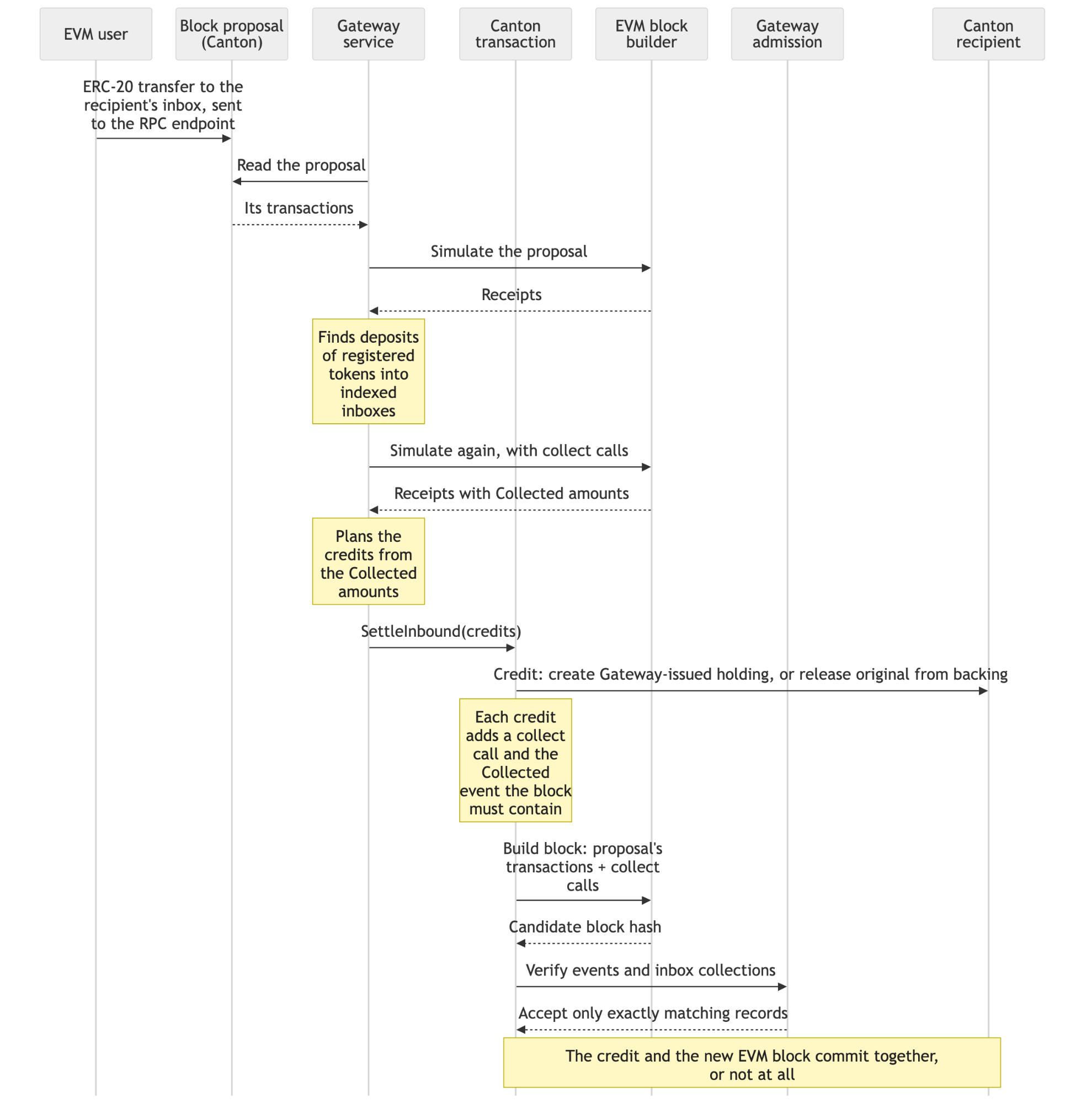
- Note: Canton refuses to build an ordinary block from a block proposal that holds an uncollected deposit of a registered token into an indexed inbox. The block that Gateway builds, with the collection and the credit, is therefore the only block that can include your transfer.
Transfer directions
| To move | You do | Guide |
|---|---|---|
| An ERC-20 token to Canton | Send it to the recipient’s inbox address with an ERC-20 transfer | Workflow 1/a |
| Gateway’s Canton token back to Zenith EVM | Send it to your mailbox party with a CIP-56 transfer | Workflow 1/b |
| A Canton (CIP-56) token to Zenith EVM | Send it to your mailbox party with a CIP-56 transfer | Workflow 2/a |
| Gateway’s ERC-20 back to Canton | Check that the recipient has a standing acceptance for the original token, then send the ERC-20 to the recipient’s inbox address with an ERC-20 transfer | Workflow 2/b |
Transfers to Canton of a registered token into the inbox of a party that Gateway has indexed are credited in the same block as your EVM transaction. If Gateway cannot deliver such a deposit (for example, wTTA sent to a party with no standing acceptance), it drops your transaction before it is included, and nothing moves. A transfer of a token that is not registered yet, or to a party that Gateway has not indexed yet, is mined in an ordinary block, and the tokens wait in the inbox. Gateway credits them within about a minute after it indexes the party or after the token is registered. wTTA is an exception: a recipient without a standing acceptance cannot be credited, and Gateway's credit of every waiting inbox then fails (see Workflow 2/b). Tokens sent to the inbox of a mailbox party or of the Gateway party are never credited and are lost.
Transfers to Zenith EVM normally start as a pending transfer, called an offer: the token’s registry leaves a pending transfer instruction addressed to the mailbox party, and the instruction waits there until Gateway accepts it. Gateway’s own tokens and the testnet’s TTA always work this way. If a token’s registry completes transfers immediately, no offer is created: the tokens go straight to the mailbox party, and Gateway settles them from there in the same kind of transaction. You cannot withdraw such a transfer, and if Gateway cannot settle it, the tokens stay with the mailbox party.
- When Gateway accepts the offer, in that same Canton transaction it moves your tokens and mints or releases them to your EVM address. The atomic step happens here, not when you send the offer.
- Until Gateway accepts the offer, you can withdraw it with
TransferInstruction_Withdrawand get your tokens back. Gateway can accept it at any time before itsexecuteBefore, usually within about one block, so a withdrawal works only if it commits first. AfterexecuteBefore, Gateway can no longer accept the offer, and it stays pending until you withdraw it. - If Gateway can never settle an offer (the token is not registered, or the mailbox party is for a different token), or its settlement is refused 3 times in a row, Gateway rejects the offer and the token’s registry returns the amount to you. TTA and Gateway’s own Canton tokens return the full amount as a new holding; another registry returns it by its own rules. A rejection needs your participant to be online. Gateway does not reject an offer after its
executeBefore; withdraw an expired offer yourself. - Some mistakes are refused when you submit, and nothing leaves your holdings: a mailbox party that does not exist (
UNKNOWN_INFORMEES, orNo mailbox for this party is visible to you…for Gateway’s tokens), a Gateway-issued token sent to another token’s mailbox party (Mailbox belongs to another instrument), and a zero amount (Nonpositive amount). - Send a token to a mailbox party only after the token is registered.
What this release includes
The Gateway release on Zenith EVM Testnet supports token transfers only.
- Included: transfers in both directions of registered tokens. That covers plain ERC-20 tokens (no fee-on-transfer, no rebasing) and CIP-56 tokens whose registry serves the token standard’s registry API. You can send from any EVM wallet or contract. On Canton, you can send from a party hosted on a participant connected to the Zenith testnet synchronizer, through any wallet or application that makes a standard CIP-56 transfer. External parties have not been tested. There is no Gateway fee: you only pay gas in ZTH for the EVM transactions you sign.
- Not included: calls between Daml and EVM contracts, transfers of native ZTH or Canton Coin, and self-service token registration. Do not send native ZTH to an inbox address. Gateway collects only registered ERC-20 tokens, and nothing can move ZTH out of an inbox.
Gateway on the testnet is operated by Zenith. Do not send anything of real value through it.
Registering your own token
You can ask Zenith to register your token with Gateway. Only Zenith can carry out a registration, and Zenith decides whether to register a token. For a CIP-56 token this is a trust decision: Gateway runs your token’s Daml code with the Gateway party’s authority, and one Gateway party holds the backing of every registered Canton token. Send your request to [email protected] with the following:
| Your token | Send us |
|---|---|
| An ERC-20 on Zenith EVM | The token’s address. It must be a plain ERC-20, with no fee-on-transfer and no rebasing. |
| A CIP-56 token on Canton | Your registry API URL; the DAR files of your token’s Daml packages (holding, transfer factory and transfer instruction templates, with their dependencies); the name and symbol you want for the ERC-20 that Gateway will deploy; and 1 unit of your token, transferred to the Gateway party after Zenith confirms that your DARs are uploaded (until then the transfer is refused). Gateway keeps the unit permanently and reads from it which parties sign your token’s holdings. A new version of your token’s package has to be uploaded the same way, so tell Zenith before you upgrade it. |
For a CIP-56 token, your registry must serve the token standard’s transfer-factory and choice-contexts/accept endpoints, and it must stay reachable. Registration is permanent.
Once your token is registered, the Gateway contract reports it. With the variables from Test tokens set: for an ERC-20, cast call $GATEWAY 'kind(address)(uint256)' <token address> --rpc-url $RPC returns 2 (see Workflow 1/a, step 1); for a CIP-56 token, cast call $GATEWAY 'wrapperOf(bytes32)(address)' $(cast keccak "cip56:<admin's full party ID>:<id>") --rpc-url $RPC returns a non-zero address, the ERC-20 that Gateway deployed for your token. Until your token is registered, do not send it to an inbox address or a mailbox party.
Interacting with Gateway
Gateway network information
| Value | |
|---|---|
| Zenith EVM RPC | https://rpc.testnet.zenith.network |
| Chain ID | 936485 |
| Block time | 5 seconds |
| Explorer | https://explorer.testnet.zenith.network/ |
| Gateway contract | 0x663f3ad617193148711d28f5334ee4ed07016602 |
| MailboxRequests contract | 0x2e983a1ba5e8b38aaaec4b440b9ddcfbf72e15d1 |
| Gateway party | gateway::12205db909e5f8c8d6b0c8033d4b52439195b73d8235c374fb653b280ca78272beb8 |
| Operator namespace | 12205db909e5f8c8d6b0c8033d4b52439195b73d8235c374fb653b280ca78272beb8 |
| Gateway registry API | https://gateway.testnet.zenith.network |
Test tokens
| Token | Value | What it is |
|---|---|---|
| TKA | 0x8464135c8f25da09e49bc8782676a84730c318bc | an ERC-20 test token on Zenith EVM (18 decimals) |
| TKA drip | 0x71c95911e9a5d330f4d621842ec243ee1343292e | contract that gives any caller 10 TKA, once a minute per address |
| TTA | admin issuer::12205db909e5f8c8d6b0c8033d4b52439195b73d8235c374fb653b280ca78272beb8, ID TTA | a CIP-56 test token on Canton (10 decimals) |
| wTTA | 0x12a62529c83cfcdd6650b4cce477d98cc9945d66 | TTA’s ERC-20 counterpart on Zenith EVM (10 decimals) |
| Test token registry API | https://gateway-partner.testnet.zenith.network | TTA’s registry API. GET /test-token/v1/faucets lists TTA’s faucet, which is a Canton contract. To mint TTA, you exercise Faucet_Mint on it through your own Ledger API (Workflow 2/a). |
Paste these into your shell. Every command below uses them:
export RPC=https://rpc.testnet.zenith.networkexport GATEWAY=0x663f3ad617193148711d28f5334ee4ed07016602export REQUESTS=0x2e983a1ba5e8b38aaaec4b440b9ddcfbf72e15d1export GATEWAY_PARTY=gateway::12205db909e5f8c8d6b0c8033d4b52439195b73d8235c374fb653b280ca78272beb8export NAMESPACE=12205db909e5f8c8d6b0c8033d4b52439195b73d8235c374fb653b280ca78272beb8export REGISTRY=https://gateway.testnet.zenith.networkexport TKA=0x8464135c8f25da09e49bc8782676a84730c318bcexport DRIP=0x71c95911e9a5d330f4d621842ec243ee1343292eexport wTTA=0x12a62529c83cfcdd6650b4cce477d98cc9945d66export TREGISTRY=https://gateway-partner.testnet.zenith.networkexport TKA_ID="erc20:$(printf %s "${TKA#0x}" | tr 'A-F' 'a-f')"You can check two values from Gateway network information against the network. The first command prints the chain ID, 936485, and the second prints the Gateway party:
cast chain-id --rpc-url $RPCcurl -s $REGISTRY/registry/metadata/v1/info | jq -r .adminIdAmounts and decimals
One EVM base unit equals 0.0000000001 (1e-10) on Canton. Transfers are exact, and Gateway never rounds. In practice:
- Tokens that Gateway issues have 10 decimals: wTTA, and the Canton counterparts of ERC-20 tokens.
- On Zenith EVM you enter base units:
3000000000000000000is 3.0 TKA (18 decimals), and20000000000is 2.0 wTTA (10 decimals). - On Canton you enter decimal amounts:
4.0TTA. A Canton amount has at most 10 decimal places. If an amount has a non-zero digit after the tenth decimal place, your participant refuses the command withCOMMAND_PREPROCESSING_FAILED(Cannot represent ... as (Numeric 10) without loss of precision). Nothing moves, and nothing is rounded. - An 18-decimal ERC-20 shows a number 100,000,000× larger on Canton: 3.0 TKA arrives as a holding of
300000000.0. It is the same value.
Set up your accounts and tools
Tools: Foundry’s cast, curl, jq, unzip and python3 (3.9+).
EVM account and funds: Create a test key, get ZTH for gas from the faucet, and take 10 TKA from the drip:
export KEY=$(cast wallet new --json | jq -r '[.. | .private_key? // empty][0]')export ME=$(cast wallet address --private-key "$KEY")echo "$ME"cast send $DRIP 'drip()' --private-key $KEY --rpc-url $RPCThe drip call only works after the faucet ZTH has arrived.
The private key exists only in the KEY variable of this shell, and every workflow signs with it. To use this address later, print the key with echo "$KEY" and save it; nothing else stores it.
Canton party (for all four workflows): Connect your participant and create a party as described in Interacting with Zenith EVM from Canton, then set:
export LEDGER=http://127.0.0.1:7575export USER_ID=my-appexport P1=<your full party ID>LEDGER is your participant’s JSON Ledger API, and USER_ID is a user with actAs and readAs rights for P1. If your Ledger API checks tokens, you add the token to the lcurl helper below.
Helper functions: Canton has no command-line tool like cast, so these shell functions wrap the JSON Ledger API and registry API calls the workflows need. Your own application makes the same calls through its Ledger API client. The code blocks contain no comments, so you can paste them into bash or zsh.
First create a directory where submit saves each request before sending it:
export RUN=$(date +%H%M%S)export REQ_DIR="$HOME/zenith-requests-$RUN"mkdir -p "$REQ_DIR"Then paste the functions:
ts() { python3 -c 'import datetime, sys; t = datetime.datetime.now(datetime.timezone.utc) + datetime.timedelta(seconds=int(sys.argv[1])); print(t.strftime("%Y-%m-%dT%H:%M:%SZ"))' "$1"}jcurl() { local out rc code out=$(curl -sS -w '\n%{http_code}' "$@") || { rc=$?; echo "error: no answer from $1 (curl exit $rc)" >&2; return 1; } code=${out##*$'\n'} printf '%s\n' "${out%$'\n'*}" case "$code" in 2??) return 0 ;; esac echo "error: HTTP $code from $1" >&2 return 1}lcurl() { local p=$1 shift jcurl "$LEDGER$p" "$@"}acs() { local r off r=$(lcurl /v2/state/ledger-end) || return 1 off=$(printf '%s\n' "$r" | jq -e '.offset | numbers') || { echo "error: unexpected ledger-end answer: $(printf '%.300s' "$r")" >&2; return 1; } r=$(jq -n --arg p "$1" --arg i "$2" --argjson off "$off" '{eventFormat: {filtersByParty: {($p): {cumulative: [{identifierFilter: {InterfaceFilter: {value: {interfaceId: $i, includeInterfaceView: true, includeCreatedEventBlob: false}}}}]}}, verbose: true}, activeAtOffset: $off}' | lcurl /v2/state/active-contracts -X POST -H 'content-type: application/json' -d @-) || return 1 printf '%s\n' "$r" | jq -e 'type == "array" and all(.[]; .contractEntry.JsActiveContract.createdEvent.interfaceViews[0].viewValue | type == "object")' >/dev/null || { echo "error: unexpected active-contracts answer: $(printf '%.300s' "$r")" >&2; return 1; } printf '%s\n' "$r"}holdings() { local r r=$(acs "$1" '#splice-api-token-holding-v1:Splice.Api.Token.HoldingV1:Holding') || return 1 printf '%s\n' "$r" | jq -c '.[].contractEntry.JsActiveContract.createdEvent | {cid: .contractId, owner: .interfaceViews[0].viewValue.owner, amount: .interfaceViews[0].viewValue.amount, id: .interfaceViews[0].viewValue.instrumentId.id, admin: .interfaceViews[0].viewValue.instrumentId.admin}'}pending() { local r r=$(acs "$1" '#splice-api-token-transfer-instruction-v1:Splice.Api.Token.TransferInstructionV1:TransferInstruction') || return 1 printf '%s\n' "$r" | jq -c '.[].contractEntry.JsActiveContract.createdEvent | {cid: .contractId, receiver: .interfaceViews[0].viewValue.transfer.receiver, amount: .interfaceViews[0].viewValue.transfer.amount, executeBefore: .interfaceViews[0].viewValue.transfer.executeBefore}'}pending_count() { local r r=$(acs "$1" '#splice-api-token-transfer-instruction-v1:Splice.Api.Token.TransferInstructionV1:TransferInstruction') || return 1 printf '%s\n' "$r" | jq length}transfer_args() { local h inputs h=$(holdings "$1") || return 1 inputs=$(printf '%s' "$h" | jq -s -c --arg id "$5" --arg a "$4" --arg o "$1" '[.[] | select(.id == $id and .admin == $a and .owner == $o) | .cid]') jq -n -c --arg admin "$4" --arg id "$5" --arg s "$1" --arg r "$2" --arg amt "$3" --arg req "$(ts -60)" --arg exp "$(ts "${6:-180}")" --argjson in "$inputs" '{expectedAdmin: $admin, transfer: {sender: $s, receiver: $r, amount: $amt, instrumentId: {admin: $admin, id: $id}, requestedAt: $req, executeBefore: $exp, inputHoldingCids: $in, meta: {values: {}}}, extraArgs: {context: {values: {}}, meta: {values: {}}}}'}ask() { jq -n -c --argjson a "$1" '{choiceArguments: $a, excludeDebugFields: true}' | jcurl "$2/registry/transfer-instruction/v1/transfer-factory" -X POST -H 'content-type: application/json' -d @-}new_cmd() { local id f id="zenith-$RUN-$1-$(python3 -c 'import uuid; print(uuid.uuid4().hex[:16])')" f="$REQ_DIR/$id.json" jq -c --arg id "$id" '.commands.commandId = $id' >"$f" && [ -s "$f" ] || { echo "error: could not build the $1 command; nothing was sent" >&2; return 1; } echo "command id $id, request saved in $f" >&2 printf '%s\n' "$f"}send_saved() { local r [ -s "$1" ] || { echo "error: no saved request at '$1'; nothing was sent" >&2; return 1; } r=$(lcurl /v2/commands/submit-and-wait-for-transaction -X POST -H 'content-type: application/json' -d @"$1") printf '%s %s\n' "$(date -u +%Y-%m-%dT%H:%M:%SZ)" "${r:-no answer}" >>"${1%.json}.answers" if printf '%s\n' "$r" | jq -e '.transaction.updateId | strings' >/dev/null 2>&1; then printf '%s\n' "$r" | jq -c '{updateId: .transaction.updateId} + ([.transaction.events[] | .ExercisedEvent // empty | select(.choice == "TransferFactory_Transfer") | .exerciseResult.output.tag] | if length > 0 then {result: first} else {} end)' return 0 fi if printf '%s\n' "$r" | jq -e '.code | strings' >/dev/null 2>&1; then printf '%s\n' "$r" | jq -c '{code, cause}' else echo "error: outcome unknown; send the same request again with: send_saved $1" >&2 fi return 1}submit() { local f jq -e -n --argjson a "$2" --argjson ans "$3" '($a | type == "object") and ($ans.factoryId | type == "string")' >/dev/null || { echo "error: bad transfer arguments or registry answer; nothing was sent" >&2; return 1; } f=$(jq -n --arg p "$1" --arg u "$USER_ID" --argjson a "$2" --argjson ans "$3" '{commands: {commands: [{ExerciseCommand: {templateId: "#splice-api-token-transfer-instruction-v1:Splice.Api.Token.TransferInstructionV1:TransferFactory", contractId: $ans.factoryId, choice: "TransferFactory_Transfer", choiceArgument: ($a + {extraArgs: {context: {values: $ans.choiceContext.choiceContextData}, meta: {values: {}}}})}}], commandId: "", userId: $u, actAs: [$p], readAs: [], disclosedContracts: $ans.choiceContext.disclosedContracts}, transactionFormat: {eventFormat: {filtersByParty: {($p): {cumulative: [{identifierFilter: {WildcardFilter: {value: {includeCreatedEventBlob: false}}}}]}}, verbose: true}, transactionShape: "TRANSACTION_SHAPE_LEDGER_EFFECTS"}}' | new_cmd transfer) || return 1 send_saved "$f"}mailbox_party() { python3 -c 'import hashlib, sys; a = sys.argv[1].lower().removeprefix("0x"); h = hashlib.sha256(("zenith-mailbox-v1|" + a + "|" + sys.argv[2]).encode()).hexdigest(); print("m-" + h + "::" + sys.argv[3])' "$1" "$2" "$NAMESPACE"}What they do:
jcurl <url> [curl options]runscurland prints the body of the answer. If no answer came, or the answer's HTTP status is not 2xx, it also prints a line starting witherror:and returns an error.lcurl <path> [curl options]isjcurlon your participant's JSON Ledger API ($LEDGER). If your Ledger API checks tokens, add-H "authorization: Bearer <token>"after"$@"inlcurl. From here on, every ledger request in this guide goes throughlcurl(steps 5 and 6, earlier, callcurldirectly). The registry requests do not go throughlcurl, so your token is never sent to a registry.holdings <party>andpending <party>list a party's holdings and pending transfers;pendingalso prints each transfer'sexecuteBefore.pending_count <party>prints the number of pending transfers. When a read fails, all three print a line starting witherror:and return an error. Ifholdingsorpendingprints nothing and there is noerror:line, the party has none.transfer_args <sender> <receiver> <amount> <admin> <id> [expiry-seconds]builds a transfer; the expiry defaults to 180 seconds.ask <transfer-args> <registry-url>asks the token's registry how to execute it.submit <party> <transfer-args> <registry-answer>submits it.submitgives each transfer a new command ID, saves the whole request as$REQ_DIR/<command id>.json, printscommand id <id>, request saved in <file>, and then sends it withsend_saved.send_saved <file>sends a saved request exactly as it is and prints one of three results:{"updateId":…}, with the transfer'sresultfor a transfer; the ledger's{"code":…,"cause":…}, after a lineerror: HTTP <status> from …, which means the ledger refused the command; orerror: outcome unknown; send the same request again with: send_saved <file>. If the file does not exist or is empty, or no file is given (for example aftererror: could not build the … command),send_savedprintserror: no saved request at '<file>'; nothing was sentand sends nothing.mailbox_party <evm-address> <instrument>computes a mailbox party ID from$NAMESPACE.
Retrying a submission: error: outcome unknown means you do not know whether the command committed. Treat a code that says the ledger timed out the same way. Send the same saved request again with send_saved <file>. After error: outcome unknown, copy the line that the error printed. After a timeout code, use the file from the earlier request saved in <file> line. It carries the same command ID and the same input holdings, so the ledger applies it at most once. If the first attempt already committed, the resend is refused with CONTRACT_NOT_FOUND or DUPLICATE_COMMAND; run holdings afterwards to see which happened. Do not build the request again with transfer_args to retry: that selects other holdings, sets a new expiry and uses a new command ID, so it makes a second transfer.
Gateway sample workflows
Workflow 1/a: Send an ERC-20 token to Canton
Send TKA from your EVM address to your Canton party P1. The recipient signs nothing and needs no standing acceptance (transfer preapproval).
1. Check that the token is registered: A result of 2 means TKA is a registered ERC-20 token. 0 means it is not registered: stop.
cast call $GATEWAY 'kind(address)(uint256)' $TKA --rpc-url $RPC2. Look up the recipient's inbox address: Use the recipient's full party ID (hint::namespace):
export INBOX=$(cast call $GATEWAY 'inboxOf(bytes)(address)' $(cast from-utf8 "${P1:?set P1 to your full party ID}") --rpc-url $RPC)If P1 is not set, the command stops with an error. Without that check, inboxOf would return the inbox of an empty party ID, and tokens sent there are lost.
3. Send 3.0 TKA to the inbox:
cast send $TKA 'transfer(address,uint256)' $INBOX 3000000000000000000 --private-key $KEY --rpc-url $RPC4. Check the result: holdings "$P1" shows a new holding with amount 300000000.0000000000, id equal to $TKA_ID and admin equal to $GATEWAY_PARTY. That is 3.0 TKA: 3000000000000000000 base units divided by 10^10.
holdings "$P1"If the party was created only moments ago, the credit can take up to about a minute. The tokens wait safely in the inbox until Gateway credits them. If nothing arrives after two minutes, contact Zenith with your full party ID and the EVM transaction hash.
Workflow 1/b: Send it back to Zenith EVM
Send 1.0 TKA's worth of P1's Canton token back to your EVM address as TKA.
1. Request your mailbox party for TKA: Gateway creates the party on Zenith's participant when it sees your request. This is needed once per EVM address and token:
export MBOX_TKA=$(mailbox_party $ME "$TKA_ID")cast send $REQUESTS 'requestMailbox(address,address)' $ME $TKA --private-key $KEY --rpc-url $RPCIt exists within a block or two. You can check by asking Gateway's registry; the answer switches to "offer" once it exists:
ask "$(transfer_args "$P1" "$MBOX_TKA" 1.0 "$GATEWAY_PARTY" "$TKA_ID")" "$REGISTRY" | jq -c '{transferKind}'2. Send the transfer: 1.0 TKA is 100000000.0 on Canton. The last argument sets the offer to expire in 3 minutes:
export ARGS=$(transfer_args "$P1" "$MBOX_TKA" 100000000.0 "$GATEWAY_PARTY" "$TKA_ID" 180)export ANS=$(ask "$ARGS" "$REGISTRY")submit "$P1" "$ARGS" "$ANS"submit prints {"updateId":"…","result":"TransferInstructionResult_Pending"}: your offer is waiting for Gateway.
3. Check the result: Within a block or so, your TKA balance has grown by 1000000000000000000, and pending_count "$P1" prints 0. The balance is the confirmation.
pending_count "$P1"cast call $TKA 'balanceOf(address)(uint256)' $ME --rpc-url $RPCIf the offer is still pending after it expires, withdraw it and tell Zenith, because Gateway normally settles an offer within a block or so. pending "$P1" prints the offer's executeBefore. The withdrawal gives you the full amount back:
export OFFER=$(pending "$P1" | jq -r --arg m "$MBOX_TKA" 'select(.receiver == $m) | .cid' | head -1)export REQ=$(jq -n --arg p "$P1" --arg u "$USER_ID" --arg c "$OFFER" \ '{commands: {commands: [{ExerciseCommand: {templateId: "#splice-api-token-transfer-instruction-v1:Splice.Api.Token.TransferInstructionV1:TransferInstruction", contractId: $c, choice: "TransferInstruction_Withdraw", choiceArgument: {extraArgs: {context: {values: {}}, meta: {values: {}}}}}}], commandId: "", userId: $u, actAs: [$p], readAs: [], disclosedContracts: []}}' \ | new_cmd withdraw)send_saved "$REQ"- Keep your participant running while an offer is pending: Your party must confirm Gateway's settlement. If your participant is offline, the offer can be neither settled nor refunded, and block production slows for everyone on the testnet until the offer's
executeBeforepasses or your participant answers again. That is why step 2 sets the offer to expire in 3 minutes. A settlement attempt that looked refused can still commit once your participant answers again, so check your TKA balance before you offer again. Stop or disconnect your participant only whenpending_count <party>prints0for each of your parties. Anerror:line means the read failed and says nothing about pending transfers.
Workflow 2/a: Send a Canton token to Zenith EVM
Send TTA from P1 to your EVM address, where it arrives as wTTA.
1. Get TTA from the faucet: Look up TTA and its faucet:
export FAUCETS=$(curl -s $TREGISTRY/test-token/v1/faucets)export TTA_FAUCET=$(echo "$FAUCETS" | jq -c '.faucets[]' | while read -r f; do k=$(echo "$f" | jq -r '"cip56:" + .instrumentId.admin + ":" + .instrumentId.id') [ "$(cast call $GATEWAY 'wrapperOf(bytes32)(address)' "$(cast keccak "$k")" --rpc-url $RPC | tr 'A-F' 'a-f')" = "$(printf %s "$wTTA" | tr 'A-F' 'a-f')" ] && echo "$f"done)export TTA_ADMIN=$(echo "$TTA_FAUCET" | jq -r .instrumentId.admin)export TTA_ID=$(echo "$TTA_FAUCET" | jq -r .instrumentId.id)Mint 10 TTA for P1. The faucet gives up to 100 TTA per call (its maxPerCall; echo "$TTA_FAUCET" | jq -r .maxPerCall prints it), and only to your own parties:
export REQ=$(jq -n --arg p "$P1" --arg u "$USER_ID" --argjson f "$TTA_FAUCET" \ '{commands: {commands: [{ExerciseCommand: {templateId: "#zenith-gateway-faucet:Zenith.GatewayFaucet.Faucet:Faucet", contractId: $f.faucet.contractId, choice: "Faucet_Mint", choiceArgument: {requester: $p, amount: "10.0"}}}], commandId: "", userId: $u, actAs: [$p], readAs: [], disclosedContracts: [$f.faucet]}}' \ | new_cmd mint)send_saved "$REQ"2. Request your mailbox party for TTA: Your EVM transaction asks for the party, and Gateway creates it on Zenith's participant within a block or two. The party ID is derived from your EVM address and TTA's full identity, cip56:<admin>:<id>, but the request names wTTA, the token on the EVM side. Wait until your participant knows the party:
export MBOX_TTA=$(mailbox_party $ME "cip56:$TTA_ADMIN:$TTA_ID")cast send $REQUESTS 'requestMailbox(address,address)' $ME $wTTA --private-key $KEY --rpc-url $RPCfor i in $(seq 1 30); do k=$(lcurl "/v2/parties/$MBOX_TTA" | jq -r '.partyDetails[0].party // "unknown"'); echo "$(date +%T) $k"; [ "$k" = "$MBOX_TTA" ] && break; sleep 1; doneIf every line prints unknown, check that $TTA_ADMIN and $TTA_ID are set, that $MBOX_TTA was computed from exactly cip56:<admin>:<id>, and that $wTTA is the published address.
3. Send 4.0 TTA: Ask TTA's own registry ($TREGISTRY), not Gateway's:
export ARGS=$(transfer_args "$P1" "$MBOX_TTA" 4.0 "$TTA_ADMIN" "$TTA_ID" 180)export ANS=$(ask "$ARGS" "$TREGISTRY")submit "$P1" "$ARGS" "$ANS"submit prints {"updateId":"…","result":"TransferInstructionResult_Pending"}: your offer is waiting for Gateway. Keep your participant running until the offer is settled. If it is still pending after it expires, withdraw it with the command in Workflow 1/b, using $MBOX_TTA in place of $MBOX_TKA.
4. Check the result: Within a block or so, your wTTA balance is 40000000000, which is 4.0 at 10 decimals:
cast call $wTTA 'balanceOf(address)(uint256)' $ME --rpc-url $RPCWorkflow 2/b: Send it back to Canton
Send 2.0 wTTA back to P1, where it arrives as TTA.
Send wTTA only to a party that Gateway has already indexed and that has a standing acceptance (transfer preapproval) for TTA. P1 meets both conditions after Workflow 1/a and step 1. A wTTA transfer to a party that is not indexed yet is mined as an ordinary transfer and waits in the inbox. If that party has no standing acceptance, Gateway cannot credit it. Because Gateway credits all waiting inbox balances in one Canton transaction, that transaction then fails for every party's inbox.
1. Allow P1 to receive TTA directly: Gateway returns TTA from its backing as an ordinary TTA transfer, and that transfer must complete in the same Canton transaction as the credit. TTA's registry completes a transfer at once only when the receiver has a standing acceptance for TTA. Without one, the transfer would only create a pending offer, Gateway refuses the credit, and after 3 refusals it drops your wTTA transfer. Create a standing acceptance for P1:
export REQ=$(jq -n --arg p "$P1" --arg u "$USER_ID" --argjson f "$TTA_FAUCET" \ '{commands: {commands: [{ExerciseCommand: {templateId: "#zenith-gateway-proto:Zenith.GatewayProto.TestToken:TestTokenRegistry", contractId: $f.registry.contractId, choice: "TestTokenRegistry_Preapprove", choiceArgument: {receiver: $p}}}], commandId: "", userId: $u, actAs: [$p], readAs: [], disclosedContracts: [$f.registry]}}' \ | new_cmd accept)send_saved "$REQ"Check it before you send. Ask TTA's registry about a transfer from the Gateway party to P1. The answer must be direct; offer means the standing acceptance is missing.
jq -n -c --arg a "$TTA_ADMIN" --arg id "$TTA_ID" --arg g "$GATEWAY_PARTY" --arg r "$P1" '{choiceArguments: {expectedAdmin: $a, transfer: {sender: $g, receiver: $r, amount: "1.0", instrumentId: {admin: $a, id: $id}}}}' \ | curl -s -X POST "$TREGISTRY/registry/transfer-instruction/v1/transfer-factory" -H 'content-type: application/json' -d @- | jq -c '{transferKind}'For your own CIP-56 tokens, recipients create a standing acceptance in whatever way your token's registry provides.
2. Send 2.0 wTTA to P1's inbox:
export INBOX=$(cast call $GATEWAY 'inboxOf(bytes)(address)' $(cast from-utf8 "${P1:?set P1 to your full party ID}") --rpc-url $RPC)cast send $wTTA 'transfer(address,uint256)' $INBOX 20000000000 --private-key $KEY --rpc-url $RPC3. Check the result: P1 has a new TTA holding of 2.0000000000:
holdings "$P1"Using Gateway from your application
The workflows above use the same calls your application makes.
From a Canton application
Receiving from Zenith EVM needs no code for tokens that started on Zenith EVM, such as TKA. To receive a Canton token that comes back from its Gateway ERC-20, such as TTA from wTTA, your party first needs a standing acceptance (transfer preapproval) with that token's registry (Workflow 2/b, step 1). Share your party's inbox address (inboxOf on the Gateway contract) with the sender. Credits appear as ordinary CIP-56 holdings of your party.
Sending to Zenith EVM is a standard CIP-56 token transfer, done in the same way as a wallet:
-
Compute the mailbox party of the destination EVM address and the token you are sending, using
mailbox_partyabove. The instrument text is:- for Gateway's Canton token of an ERC-20 original:
erc20:<the ERC-20 original's address in lower case, without 0x>(for TKA's Canton token, this is$TKA_ID); - for a Canton (CIP-56) original:
cip56:<admin's full party ID>:<id>. Do not put the address of Gateway's ERC-20 for it (wTTA) in anerc20:text.
If the party does not exist yet, request it with
requestMailbox(account, token)on the MailboxRequests contract ($REQUESTS).accountis the destination EVM address.tokenis the token's ERC-20 on Zenith EVM: the original itself (TKA), or Gateway's ERC-20 for a Canton original (wTTA). Gateway creates the party within a block or two if the token is registered, and ignores the request otherwise. Wait until your participant knows the party before you send. - for Gateway's Canton token of an ERC-20 original:
-
Build the transfer with a
requestedAtslightly in the past (the ledger refuses one later than ledger time) and a shortexecuteBefore, for example a few minutes ahead. Send it aschoiceArgumentsto the token registry'sPOST /registry/transfer-instruction/v1/transfer-factory:- for Gateway-issued tokens, call Gateway's registry;
- for other tokens, call the token's own registry.
-
Exercise
TransferFactory_Transferon the returnedfactoryIdwith the transfer you sent. Pass the returnedchoiceContextDataasextraArgs.context.values, and add the returneddisclosedContractsto the command'sdisclosedContracts. -
Your transfer leaves a pending transfer instruction, and Gateway settles it. Keep your participant running and connected until the instruction is settled, rejected or withdrawn (see Keep your participant online). If it is still pending after
executeBefore, withdraw it withTransferInstruction_Withdraw. For a token that is not Gateway's, first ask the token's registry for the withdraw context (POST <registry>/registry/transfer-instruction/v1/<instruction-id>/choice-contexts/withdraw) and pass it as in step 3. Gateway's and TTA's registries return an empty context.
The submit helper above shows the exact JSON Ledger API command.
- Note: Gateway's package also has a one-transaction route (
GatewayService_CrossToEvm). It is not available to external participants on this testnet: it needs the external-call extension and contracts that only the operator can disclose (see What your participant cannot do on this testnet). Use the standard transfer above.
From an EVM contract or application
Sending to a Canton party is a plain ERC-20 transfer to the party's inbox. You need no Gateway library, no allowance and no callback.
interface IZenithGateway { function inboxOf(bytes calldata partyId) external view returns (address); function kind(address token) external view returns (uint256); // 0 = not registered}// partyId is the recipient's full Canton party ID, e.g. "alice::1220…"address inbox = IZenithGateway(gateway).inboxOf(bytes(partyId));IERC20(token).transfer(inbox, amount);With ethers v6:
const gateway = new Contract(GATEWAY, ["function inboxOf(bytes) view returns (address)"], provider);const inbox = await gateway.inboxOf(toUtf8Bytes(partyId));await new Contract(token, ["function transfer(address,uint256) returns (bool)"], wallet).transfer(inbox, amount);A party's inbox address is computed from its full party ID, the chain ID, the Gateway contract address and the inbox code hash. None of these change while this deployment runs, so you can store the address. If Zenith redeploys the testnet or the Gateway contract, look up every stored inbox again with inboxOf. Tokens sent to an address computed for an earlier deployment are lost.
Your contract cannot see the Canton credit, and a receipt alone does not prove one. Gateway treats a transfer as a deposit only if it sends a non-zero amount of a registered token to the inbox of a party that Gateway has indexed. Such a transfer can only be mined in the block that also credits it, so for that transfer a receipt means the credit was made. If Gateway cannot settle the deposit, it leaves your transaction out of the block: the transaction is never mined, you get no receipt, and your tokens and gas are not spent. About three blocks later the sequencer discards it, together with every later transaction you sent from the same address. Do not wait for a receipt without a time limit; in ethers v6, pass a timeout, for example tx.wait(1, 120_000). To confirm a drop and resend, see the first row of Common problems. Any other transfer to an inbox address is mined in an ordinary block without a credit (see Transfer directions). Before you send, check kind(token) and use the recipient's full party ID.
Gateway troubleshooting
Before you send
- Check the token is registered before sending it anywhere. For an ERC-20,
kind(<token address>)returns non-zero. For a Canton token,wrapperOfofcast keccak "cip56:<admin>:<id>"returns a non-zero address. - Use full party IDs (
hint::namespace): A shortened ID gives the inbox address of an ID that no party can have. Gateway never credits tokens sent there, and they are lost. - Never send tokens to the inbox of a mailbox party (an ID starting with
m-), of the Gateway party, or of the chain party (the Zenith party that signs the chain's blocks,<to be added>): Gateway never credits them, and the tokens are lost. - Use the mailbox party for the exact token you are sending.
- Read the token's decimals: Gateway-issued tokens have 10.
Common problems
| Symptom | Cause | What to do |
|---|---|---|
| Your EVM transfer never gets a receipt, and your later transactions don't go through either | Gateway most likely could not deliver the deposit and left your transaction out of the block. About three blocks later the sequencer discards it, together with your later transactions from that address. Nothing moved. | A missing receipt alone does not prove a drop. Check all four: cast rpc eth_getTransactionByHash <hash> --rpc-url $RPC prints null; cast nonce $ME --rpc-url $RPC still shows that transaction's nonce; the balances it would change are unchanged; cast block-number --rpc-url $RPC rises between two reads. If the lookup still returns the transaction, it is waiting: do not resend. If the block number does not rise, blocks have stopped: wait, and contact Zenith if it continues. Once all four hold, fix the cause (usually the next row). Then send the transfer again at the same nonce (cast send ... --nonce <nonce>), followed by each later transaction in nonce order. |
| No receipt after sending wTTA (or another Gateway ERC-20) to Canton | The recipient has no standing acceptance (transfer preapproval) for the token | Have the recipient create a standing acceptance with the token's own registry. For TTA, the recipient runs Workflow 2/b, step 1. Then confirm the drop as in the row above, and resend at the same nonce. |
| Receipt, but the tokens are still in the inbox | The recipient party is brand new, or the token isn't registered yet | Wait about a minute. Unregistered tokens are credited once the token is registered. wTTA (or another Gateway ERC-20) is credited only once the recipient has a standing acceptance (Workflow 2/b, step 1). Tokens sent to the inbox of a mailbox party, of the Gateway party or of an incomplete party ID never arrive. If nothing arrives within two minutes, contact Zenith. |
| Your offer is still pending after several blocks | Gateway settles one offer at a time, and settles deposits from Zenith EVM first. An offer also stays pending while your participant is stopped or disconnected, or while Gateway is stopped. | Keep your participant running and connected. If it was stopped or disconnected, reconnect it at once; the settlement may then complete. Otherwise wait a few more blocks. If the offer is still pending after executeBefore, withdraw it and contact Zenith. |
| Your offer disappeared and the full amount is back in your holdings | Gateway rejected it: the mailbox party is for another token, the token is not registered, or its settlement was refused 3 times in a row | If one of the first two causes applies, fix it and send again. Otherwise, contact Zenith with the Canton update ID of your offer and the time in UTC. |
No mailbox for this party is visible to you… | The mailbox party doesn't exist yet, or you didn't disclose the contracts the registry returned | Request the mailbox party, then submit with the registry's disclosed contracts. |
UNKNOWN_INFORMEES (not connected to any synchronizer where the given informees are known) | The receiver party does not exist. Usually it is a mailbox party computed from the wrong instrument text, or one that has not been created yet. This is not a connection problem. | Recompute the mailbox party from the full instrument text (cip56:<admin>:<id> for a Canton token), request it if needed, and wait until lcurl "/v2/parties/<id>" returns it. |
ask prints error: HTTP 400 from …/transfer-factory, submit prints error: bad transfer arguments or registry answer; nothing was sent, and echo "$ANS" shows {"error":"the receiver cannot receive this instrument"}; or a submission fails with Mailbox belongs to another instrument | Wrong mailbox party for this token | Recompute the mailbox party from your EVM address and erc20:<lowercase address of the token you are sending, no 0x>. |
External calls not supported | You used the one-transaction route | Use the standard transfer to a mailbox party. |
Your drip() call fails with cooldown | You already dripped in the last minute | Wait a minute. |
Your drip() call fails with empty | The drip holds less than 10 TKA. Waiting does not help. | Contact Zenith to have it refilled. |
If a transfer remains unexplained, contact Zenith at [email protected]. Include the EVM transaction hash, the Canton update ID if you have one, and the time in UTC.
Concepts and architecture
This section provides a technical overview of Zenith EVM, how it works, how it relates to Canton, and how EVM execution is coordinated through Canton-mediated block production.
What is Zenith EVM?
Zenith EVM is a reference EVM execution environment built on Reth, a high-performance, modular Ethereum execution client. It exposes a standard Ethereum JSON-RPC interface, which means developers can interact with Zenith EVM exactly as they would with any Ethereum-compatible chain.
From a developer's perspective:
- Deploy smart contracts using Solidity, Foundry, Hardhat, or any EVM toolchain, no modifications required.
- Connect wallets like MetaMask by adding Zenith EVM as a custom network.
- Use existing libraries, such as ethers.js, viem, web3.js, OpenZeppelin, all work out of the box.
What makes Zenith EVM different from a standalone EVM chain is its relationship with Canton: all EVM activity is routed through Canton and settles on Canton MainNet. This gives Zenith EVM the regulatory and compliance guarantees of Canton while preserving the full Ethereum developer experience.
Zenith EVM is maintained by Zenith, a registered Canton Super Validator. Enterprises and developers who want to launch their own customizable EVM environments can do so via the Zenith Stack.
How Zenith EVM relates to Canton
Zenith EVM is best understood as an EVM-based subnet on Canton. It is not a separate chain with its own Ethereum-style consensus layer. Instead, Zenith EVM’s block production, canonical chain state, and finality are mediated through Canton.
At a high level:
- EVM users submit standard EVM transactions through JSON-RPC.
- Transactions are collected and batched into Canton-side block proposals.
- Validators rebuild the proposed EVM block from the same ordered inputs.
- Canton finality determines which proposed EVM block becomes canonical.
- The finalized block is then propagated back to the EVM execution side.
This architecture lets Zenith EVM preserve normal Ethereum tooling and execution semantics while relying on Canton for deterministic finality and Canton-native atomic composability.
On-ledger representation on Canton
Zenith EVM is represented on Canton by a set of Daml contracts rather than a single monolithic state contract. Together, these contracts record the canonical EVM chain state and govern how new blocks are produced and finalized.
Identifiers used to organize this on-ledger state on the Canton side are distinct from the Ethereum EIP-155 chain ID used by wallets and EVM transactions.
Because block production and canonical chain state are governed through Canton contracts and validator confirmations rather than a separate Ethereum consensus layer, Zenith EVM inherits Canton’s finality and trust model. The specific on-ledger contract design is internal to the Zenith EVM implementation.
The external_call() primitive
Zenith EVM uses external_call() to connect Canton-side Daml workflows with deterministic EVM execution.
The external_call() primitive follows Canton's native two-step validation process:
- Submission phase: The submitting participant executes the
external_call()during interpretation and includes the result, hash and metadata in the transaction view. - Validation phase: validators independently re-execute the same operation locally against their own EVM node.
- Consensus and finality: The transaction is confirmed when a threshold of validators agree on the output. Following a BFT-style quorum model at least two-thirds of the validators need to agree, or the transaction will be rejected. The Canton mediator finalizes the transaction once the required validator-confirmation threshold is reached.
This design does not introduce additional trust assumptions beyond Canton's existing model.
The practical guarantee for transactions spanning Canton and Zenith EVM is:
- If the Canton leg and EVM leg both succeed, the combined transaction commits.
- If either leg fails, the whole transaction fails.
- A failed workflow does not leave a partially committed EVM or Canton-side state transition.
Validator nodes
A Zenith EVM validator is a Canton participant that is authorized to verify and confirm block production for the EVM chain. Validators run both the Canton and EVM node software needed to take part in this process, but the canonical chain is not determined by any single node.
The source of truth for the Zenith EVM chain is the Canton-finalized sequence of blocks, not any individual node’s local view. A node may build candidate blocks but the canonical state is updated only after Canton finality.
Block building
Block building on Zenith EVM differs from Ethereum mainnet. Zenith EVM does not use Ethereum’s mempool-driven proposer-builder flow or Ethereum Beacon Chain validator selection. Instead, blocks are built through a Canton-mediated proposal flow.
At a high level, transactions destined for the next block are collected and ordered on the Canton side. When the next block is ready, an authorized validator drives the build:
- a candidate block is assembled and executed from the ordered set of transactions, and
- other validators independently rebuild the same block from the same inputs.
Canton finality then determines whether the proposed block becomes canonical, after which it is propagated to the EVM execution layer and its state is updated.
Transactions that fail validation may be rejected and omitted from the resulting block. If a submitted transaction is rejected, it will not appear in the resulting block, and its receipt will be absent.
Finality and latency
Finality of Zenith EVM transactions is provided by Canton consensus. Validators independently rebuild the proposed EVM block from the same inputs, and the Canton mediator finalizes the block-building transaction once the required validator-confirmation threshold is reached.
Because EVM execution is coordinated through the Canton transaction flow:
- Execution is atomic: either the combined Canton/EVM workflow commits, or it fails as a whole.
- Finality is deterministic: once the Canton transaction is confirmed, the EVM state transition is final.
- There are no EVM reorgs after Canton finality: canonical EVM state follows the finalized Canton-mediated block sequence.
On the current testnet, typical end-to-end latency of the additional EVM operations within a Canton-native transaction fluctuates between 400ms and 1.5 seconds. This adds only minimal latency compared to a Canton-only transaction, which reaches finality in approximately 4–5 seconds.
Note: These latency numbers are from early testnet measurements and have not yet been optimized.
Differences from Ethereum Mainnet
Since Zenith EVM is built on Reth and exposes a standard Ethereum RPC interface, you can apply the same development patterns directly on Zenith. This section highlights what's different.
What's the same?
| Area | Zenith EVM behavior |
|---|---|
| EVM execution | Same bytecode execution, same opcodes. |
| Solidity contracts | Standard Solidity contracts can be deployed with no or minimal modification. |
| RPC | Standard Ethereum JSON-RPC interface |
| Tooling | Works with common EVM tools such as MetaMask, Foundry, Hardhat, Remix, ethers.js, etc. |
| Transactions | Standard EVM transaction signing and submission. |
| Gas accounting | The current Zenith EVM testnet uses standard EVM gas semantics at the execution layer. |
| Standards | Standard ERC contracts can be deployed and used natively. |
| Forks | All current forks from Ethereum’s genesis will be enabled on Zenith EVM. |
Note: Gas accounting on Zenith EVM mainnet will include an additional element covering Canton transaction fees.
What's different?
| Area | Ethereum mainnet | Zenith EVM |
|---|---|---|
| Consensus | Ethereum proof-of-stake consensus. | Canton-mediated validation and finality. |
| Finality | Probabilistic (2 epochs / ~13 min for finality) | Deterministic, within a few seconds. No reorgs. |
| Reorgs | Possible before finality. | No EVM reorgs after Canton finality. |
| Beacon Chain | Ethereum uses the Beacon Chain for consensus and validator selection randomness. | Zenith EVM does not use the Ethereum Beacon Chain. |
PREVRANDAO | Populated from Ethereum consensus context. | Provided as a block-building environment attribute (Prev RANDAO) by Zenith's Canton-mediated block-building flow, rather than by Ethereum Beacon Chain randomness. Contracts should not assume Ethereum mainnet validator-selection randomness semantics. |
| Block production | Ethereum validators propose blocks according to Ethereum consensus rules. | Block proposers submit Canton-side block proposals; validators build and confirm blocks through Canton consensus. |
| Block time | 12-second block time | Our testnet will have a 5-second block time. For mainnet, we are aiming for 1- second block time. |
| Settlement | Ethereum mainnet settlement. | EVM blocks and state roots settle on Canton. |
| Atomic interop with Canton | Not available natively. | Canton-native workflows and Zenith EVM execution can be coordinated as part of a single atomic Daml workflow. |
| Staking | Validators stake 32 ETH | Validators are authorized Canton participants; no staking mechanism |
| Trust model | Ethereum validator set and Ethereum consensus rules. | Follows Canton’s trust model |
| Explorer metadata | EVM-only transaction metadata. | EVM transaction metadata plus Canton update metadata. |
Implications for Developers
- Standard EVM workflows still work: deployment, interaction, events, receipts, and tooling remain familiar.
- Confirmed transactions are final: once a transaction is finalized through Canton, applications generally do not need to wait for multiple block confirmations as they would on probabilistic-finality chains.
- Dual transaction identity: an EVM transaction can be traced with the corresponding Canton update ID of the EVM block it was included in.
- Canton-native workflows can coordinate EVM execution: all Zenith EVM transaction batches are processed through the atomic Canton-mediated block-building path.
- Receipt checks for atomic workflows: if an EVM transaction is rejected, its receipt will be absent; Canton-side workflows should treat this as a failed EVM leg.
- Do not rely on Ethereum Beacon Chain randomness semantics: contracts using block.prevrandao should account for the fact that Zenith EVM does not source this value from Ethereum Beacon Chain validator-selection randomness.
Interoperability
Zenith EVM supports two complementary interoperability models:
- Gateway, Zenith’s atomic interoperability path between Canton-native workflows and Zenith EVM; and
- External ecosystem interoperability, which will connect Zenith EVM to external chains and messaging ecosystems.
Zenith Gateway
The Gateway, Zenith’s native interoperability protocol, connects assets and applications on Canton with Zenith EVM. It is designed to support asset transfers and contract calls in both directions, allowing applications to combine Canton and EVM operations in a single transaction.
As an example, a Canton workflow can move an eligible asset into Zenith EVM, use it in an application, and return value to Canton as one coordinated operation.
Gateway vs external bridges
Gateway is part of Zenith’s core protocol, and inherits its trust model from Canton. Therefore it has to be distinguished from third-party bridges or cross-chain messaging protocols.
| Property | Gateway | Third-party interop / messaging protocol |
|---|---|---|
| Primary scope | Canton ↔ Zenith EVM | Zenith EVM ↔ external ecosystems |
| Execution model | Canton-mediated block production | Cross-chain message passing or token transfer |
| Finality model | Canton’s trust and finality model for the combined workflow | Depends on the source chain, destination chain, and protocol assumptions |
| Failure behavior | No partial Canton/EVM commit for a single atomic workflow | Usually asynchronous; failure and retry behavior are protocol-specific |
| Best use case | Canton-native and EVM-native assets in combined workflows, Daml workflows interacting with Zenith EVM contracts | Interoperability with Ethereum, Base, Solana, and other external ecosystems |
Atomic settlement
An asset transfer between Canton and Zenith EVM through Gateway is called a crossing. Each crossing is atomic: the deduction on the sender side, the receipt on the destination side, and the corresponding EVM block are recorded together in one completed and indivisible Canton transaction.
Validators check the combined execution and asset movements before settlement. If the enclosing workflow aborts, its asset movements and application changes do not commit.
Moving assets between Canton and Zenith EVM
Gateway makes eligible assets available in the other environment through creating their respective representations:
- Canton assets can be represented as ERC-20 tokens on Zenith EVM, while
- EVM assets can be represented using Canton's CIP-56 (or in the future CIP-112) token standard.
A representation is continuously backed by the underlying asset.
When an asset crosses, Gateway coordinates the locking of the original asset with the minting of its representation on the receiving side atomically. Returning a wrapped asset to its source chain burns that representation and releases the underlying asset within the same transaction.
The transfer route depends on the asset's rules. Some assets require recipient acceptance or advance permission to receive a transfer. A pending transfer offer is not a completed crossing; the crossing occurs when acceptance and delivery settle together.
Connecting Daml and Solidity applications
Daml applications can call Solidity contracts and receive results while the same workflow is executing. EVM applications can call Daml contract operations exposed through Gateway. This allows developers to combine logic across both environments and use the outcome of one call to determine the next action.
Canton users authorize actions through Canton and can interact with EVM applications without managing an EVM private key. EVM users can sign with their existing wallets without maintaining a Canton party. Calls remain subject to the permissions required by the target application.
Gateway uses standard Ethereum transactions and contract interfaces, so developers can work with familiar Solidity contracts, wallets, and EVM tools. Applications can handle individual call failures where appropriate; an unhandled failure or explicit abort rolls back the enclosing workflow across both environments.
How execution settles
Gateway combines Daml and EVM execution around a single Head: the protocol's record of the latest settled EVM block. Each new block extends that record:
- The user authorizes the action with a Canton command or a signed EVM transaction.
- The block producer, preparing the next block, evaluates the Daml workflow and EVM calls together. Each call returns its result while the calling workflow is still executing.
- The producer builds an ordinary Ethereum block and the corresponding Canton changes. Changes from calls that fail or are later undone are discarded on both sides.
- Independent validators re-execute the Daml and EVM operations. They check the user's authorization, actual asset movements, call results, and that the new block extends the latest settled block.
- Once the required Canton confirmations are obtained, the combined transaction commits on Canton and the Head is updated. The EVM block is then published back to the EVM nodes that record the new chain head.
Results and settlement verification
Applications receive call results within the same transaction and can inspect normal EVM receipts and logs. A receipt's presence alone does not prove success. An EVM transfer evaluated before settlement also does not prove that delivery on Canton or collection into backing reserves completed. Gateway checks the complete execution and matching asset movements before accepting the block into the chain.
For transaction tracking, check the receipt from the accepted block, its success or failure status, and the expected result or events. Match it to the Canton update that recorded the workflow. The Canton update ID is separate from the standard Ethereum receipt. Daml applications can also read EVM balances, storage, and call results at a particular settled Head without producing a block or charging EVM gas.
To test Gateway in the Zenith EVM testnet, dive into our Canton and Gateway developer guides.
External ecosystem interoperability
External ecosystem interoperability is separate from Gateway.
Gateway is designed for Canton ↔ Zenith EVM atomic composability because both sides of the workflow are mediated through Canton. External interoperability with ecosystems such as Ethereum, Base, Solana, or other L1/L2 networks follows a different model: cross-chain messaging, bridging, or token transfer across independent networks.
These integrations may use established cross-chain messaging or bridge protocols, such as CCIP or LayerZero. They would follow the trust, finality, retry, and failure assumptions of the selected external protocol rather than Gateway’s Canton-mediated atomicity.
Current status: Gateway is the primary Canton ↔ Zenith EVM interoperability mechanism for atomic workflows. External ecosystem integrations are separate roadmap items.